
All Worksheets
Browse our complete collection of free printable worksheets
Filter Worksheets
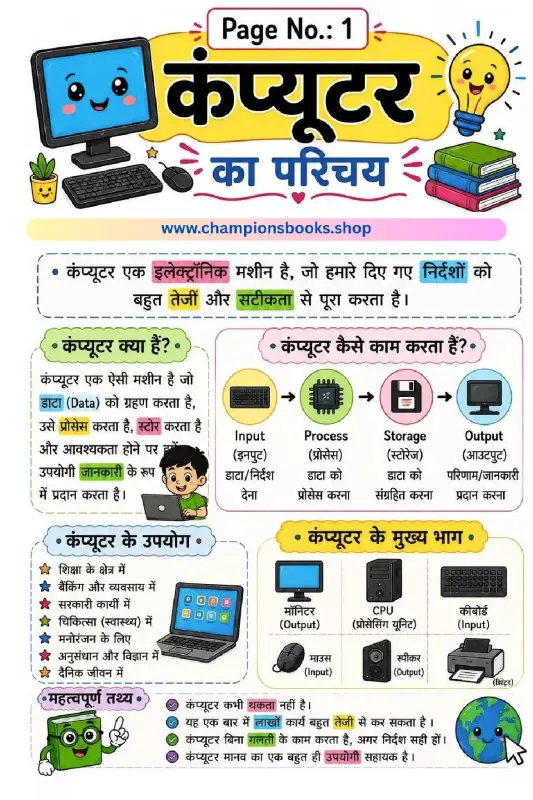
Computer Ka Parichay Worksheet | Kids Computer Basics
About this Worksheet The Computer Ka Parichay Worksheet is an engaging and educational resource designed for young learners, particularly in Grade 1. This colorful Hindi worksheet introduces children to the fundamental concepts of computers in an easy-to-understand format. By utilizing clear illustrations and simple Hindi language, it helps students grasp what a computer is and how it functions in our daily lives. Key Topics Covered This comprehensive worksheet covers essential foundational topics in computer science: What is a Computer? (कंप्यूटर क्या है?): Introduces the computer as an electronic machine that processes data and provides useful information. How Computers Work: Explains the core cycle of Input, Process, Storage, and Output using relatable icons. Main Parts of a Computer (कंप्यूटर के मुख्य भाग): Familiarizes kids with essential hardware components like the Monitor, CPU, Keyboard, Mouse, Speaker, and Printer. Uses of Computers (कंप्यूटर के उपयोग): Highlights where computers are used, such as in education, banking, healthcare, and entertainment. Fun Facts (महत्वपूर्ण तथ्य): Shares interesting trivia, like how computers never get tired and perform tasks with high speed and accuracy. Learning Benefits Using this worksheet offers several educational advantages for primary school students: Builds early digital literacy and computer vocabulary in Hindi. Enhances cognitive skills through visual learning and logical flowcharts. Perfect for classroom teaching, homework assignments, or homeschooling resources.
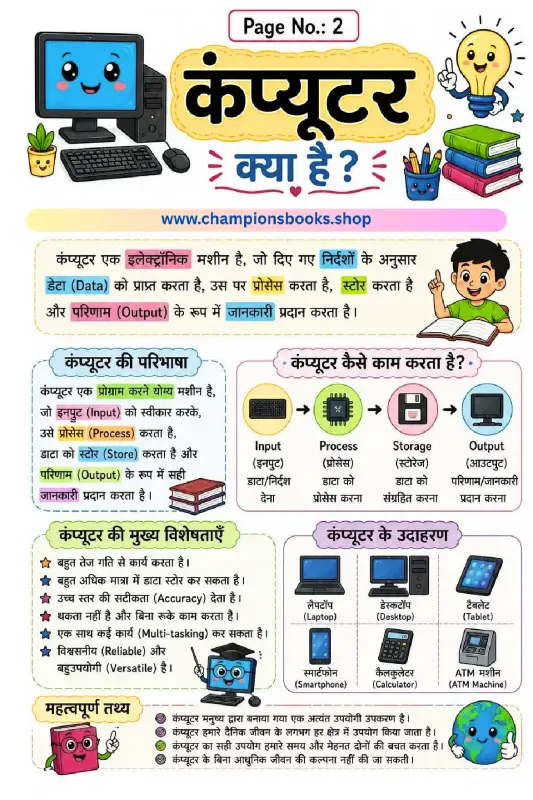
Computer Kya Hai Worksheet: Learn Computer Basics in Hindi
About this Worksheet Our Computer Kya Hai Worksheet is a beautifully designed, colorful educational resource tailored for young learners in primary grades. Written entirely in Hindi, this worksheet introduces children to the fundamental concept of computers. It answers the basic question, 'What is a computer?' in an engaging, easy-to-understand manner. Perfect for teachers and parents, this worksheet helps simplify technology concepts for kids, making it an ideal teaching aid for early computer science lessons. Key Learning Topics Covered Computer Definition (कंप्यूटर की परिभाषा): Understands how a computer processes instructions, stores data, and outputs results. How a Computer Works (आईपीओ चक्र): Visual representation of the Input, Process, Storage, and Output (IPSO) cycle. Main Characteristics (कंप्यूटर की विशेषताएं): Learn about speed, high storage capacity, accuracy, multi-tasking, and reliability. Examples of Computers (कंप्यूटर के उदाहरण): Identification of everyday devices like laptops, desktops, tablets, smartphones, calculators, and ATMs. Important Facts (महत्वपूर्ण तथ्य): Fun and essential facts about how computers save time and effort in daily life. Learning Benefits for Young Minds Visual Learning: Bright illustrations and clear diagrams keep children engaged and help them retain information longer. Bilingual Understanding: Key terms are provided in both Hindi and English to build strong foundational vocabulary. Critical Thinking: Encourages students to identify different types of computers they encounter in daily life. Easy to Download & Print: Perfect for classroom activities, homework assignments, or homeschooling lessons.
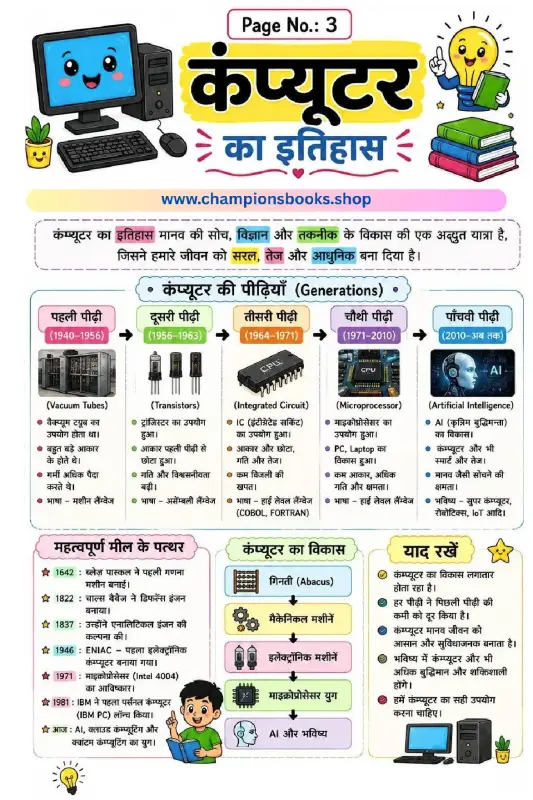
History of Computer in Hindi - Generations & Milestones
About this Worksheet: History of Computer in Hindi Explore the fascinating journey of technology with our colorful and engaging History of Computer in Hindi educational worksheet. Specially designed for elementary school students, this comprehensive visual guide simplifies complex technological milestones into easy-to-understand sections. It serves as an excellent resource for teachers, parents, and young learners to grasp how computers evolved from simple counting tools to highly intelligent machines. Key Topics Covered Generations of Computers (कंप्यूटर की पीढ़ियाँ): A complete timeline from the First Generation (Vacuum Tubes, 1940-1956) to the Fifth Generation (Artificial Intelligence, 2010-Present). Historical Milestones (महत्वपूर्ण मील के पत्थर): Key historical events starting from Blaise Pascal's calculator in 1642, Charles Babbage's analytical engine, ENIAC, up to modern AI and cloud computing. Evolution of Computing (कंप्यूटर का विकास): A step-by-step flowchart tracking development from the Abacus and mechanical machines to microprocessors and AI. Important Takeaways (याद रखें): Quick-reference facts highlighting how computers continuously evolve to make human life easier and more efficient. Learning Benefits Enhances technological literacy by introducing foundational computer history concepts. Supports Hindi vocabulary development with specialized scientific and technical terms. Improves visual learning through clear diagrams, timelines, and engaging illustrations. Encourages critical thinking about how technology shapes our daily lives and future.
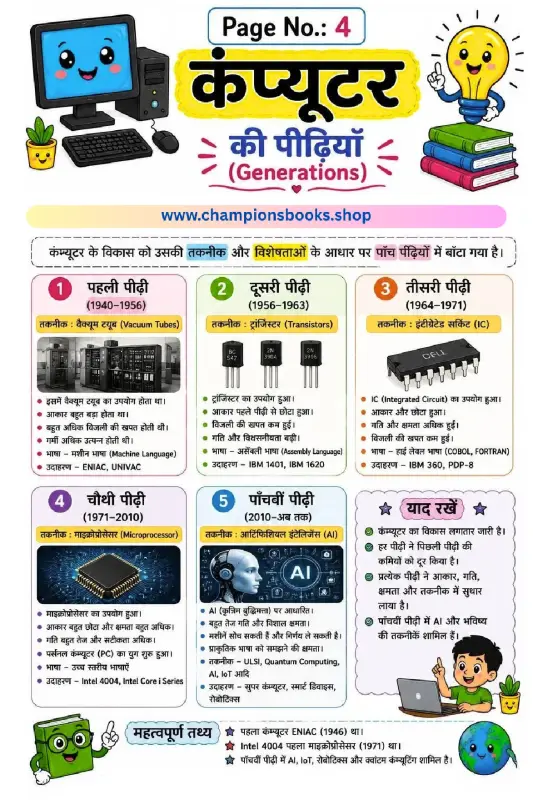
Generations of Computer in Hindi | Learn Computer History
About this Computer Generations Worksheet This colorful and highly engaging educational infographic is designed to help Grade 4 students easily learn about the Generations of Computer in Hindi. Understanding the evolution of technology is a fundamental part of primary school computer science. This worksheet simplifies complex historical milestones into five clear, digestible sections, complete with key highlights, technology used, and real-world examples. Key Features of the 5 Generations of Computers The chart beautifully illustrates how computers evolved over the decades. Students will learn about the technology behind each era: First Generation (1940-1956): Powered by Vacuum Tubes. These computers were massive in size, consumed high electricity, and used machine language. Examples include ENIAC and UNIVAC. Second Generation (1956-1963): Introduced Transistors, making computers smaller, faster, and more energy-efficient. Examples: IBM 1401 and IBM 1620. Third Generation (1964-1971): Utilized Integrated Circuits (ICs), which significantly improved speed and computational capacity. Examples: IBM 360. Fourth Generation (1971-2010): Revolutionized by Microprocessors, paving the way for modern personal computers (PCs). Examples: Intel 4004. Fifth Generation (2010-Present): Focuses on Artificial Intelligence (AI), quantum computing, and advanced robotics. Learning Benefits for Young Minds Using visual study aids like this offers several educational advantages for elementary students: Bilingual Learning: Helps children learn technical computer terms in both Hindi and English. Critical Thinking: Encourages students to compare how size, speed, and efficiency improved with each generation. Exam Readiness: Key facts like the invention of ENIAC are highlighted to help students score better in school tests.
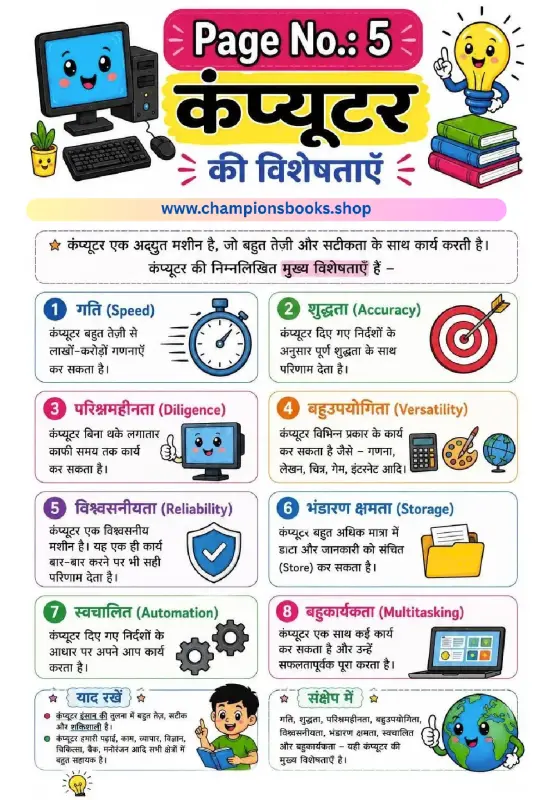
कंप्यूटर की विशेषताएँ - Characteristics of Computer in Hindi
About this Worksheet Introduce young learners to the foundational concepts of computer science with our colorful Characteristics of Computer in Hindi (कंप्यूटर की विशेषताएँ) worksheet. Designed specifically for Grade 3 students, this educational chart makes it easy to understand how computers work and why they are such powerful machines in our daily lives. Key Characteristics of Computer (कंप्यूटर की मुख्य विशेषताएँ) This worksheet highlights eight essential features of a computer in an easy-to-understand Hindi format, accompanied by relatable icons: गति (Speed): कंप्यूटर बहुत तेज़ी से लाखों-करोड़ों गणनाएँ कर सकता है। शुद्धता (Accuracy): कंप्यूटर दिए गए निर्देशों के अनुसार पूर्ण शुद्धता के साथ परिणाम देता है। परिश्रमहीनता (Diligence): कंप्यूटर बिना थके लगातार काफी समय तक कार्य कर सकता है। बहुउपयोगिता (Versatility): कंप्यूटर विभिन्न प्रकार के कार्य कर सकता है जैसे - गणना, लेखन, चित्र, गेम, इंटरनेट आदि। विश्वसनीयता (Reliability): यह एक ही कार्य बार-बार करने पर भी सही परिणाम देता है। भंडारण क्षमता (Storage): कंप्यूटर बहुत अधिक मात्रा में डाटा और जानकारी को संचित (Store) कर सकता है। स्वचालित (Automation): कंप्यूटर दिए गए निर्देशों के आधार पर अपने आप कार्य करता है। बहुकार्यकता (Multitasking): कंप्यूटर एक साथ कई कार्य कर सकता है और उन्हें सफलतापूर्वक पूरा करता है। Learning Benefits Bilingual Vocabulary: Helps children connect Hindi terms with standard English computer terminology like Diligence, Versatility, and Automation. Visual Learning: Engaging illustrations make abstract concepts like storage and processing speed easier for Grade 3 students to grasp. Cognitive Development: Encourages logical thinking and basic computer literacy from an early age.
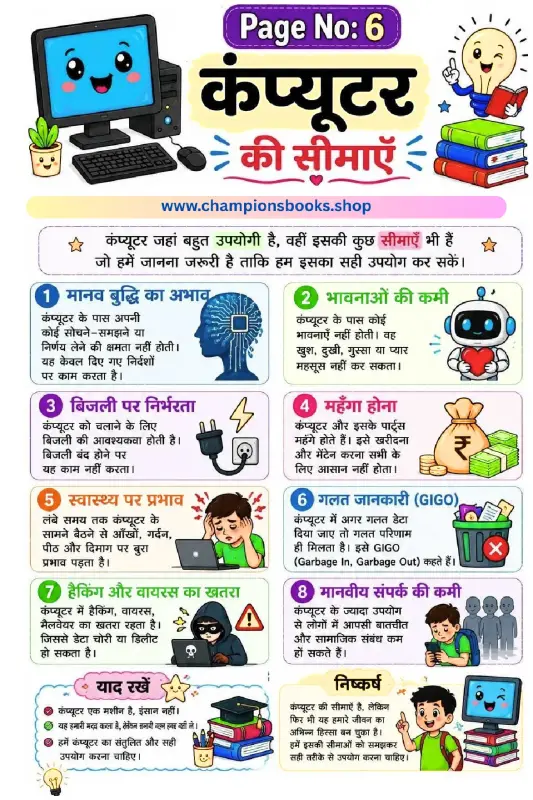
Limitations of Computer in Hindi - Grade 3 Worksheet
About this Worksheet: Computer ki Seemaye This colorful and engaging educational worksheet is designed for Grade 3 students to help them understand the limitations of computer in Hindi (कंप्यूटर की सीमाएँ). While computers are incredibly useful and powerful machines, they also have certain limitations and disadvantages that children should learn to ensure responsible usage. Key Learning Points Covered The worksheet beautifully illustrates 8 major limitations of computers with easy-to-understand Hindi text and graphics: मानव बुद्धि का अभाव (Lack of Intelligence): Computers cannot think, understand, or make decisions on their own; they only follow instructions. भावनाओं की कमी (No Emotions): Computers do not feel happiness, sadness, anger, or love. बिजली पर निर्भरता (Dependency on Electricity): A computer cannot function without electricity or battery power. महँगा होना (High Cost): Buying and maintaining computers and their parts can be expensive. स्वास्थ्य पर प्रभाव (Health Impacts): Sitting in front of a computer for long hours can negatively affect the eyes, neck, back, and mind. गलत जानकारी (GIGO - Garbage In, Garbage Out): If incorrect data is entered, the computer will produce incorrect results. हैकिंग और वायरस का खतरा (Hacking and Virus Threat): There is always a risk of data theft, malware, and cyber threats. मानवीय संपर्क की कमी (Reduced Social Interaction): Excessive computer use can lead to less face-to-face communication and weaker social bonds. Learning Benefits for Kids Promotes a balanced perspective on technology and digital wellness. Introduces essential computer science terminology in Hindi. Encourages critical thinking about how and when to use digital devices safely.
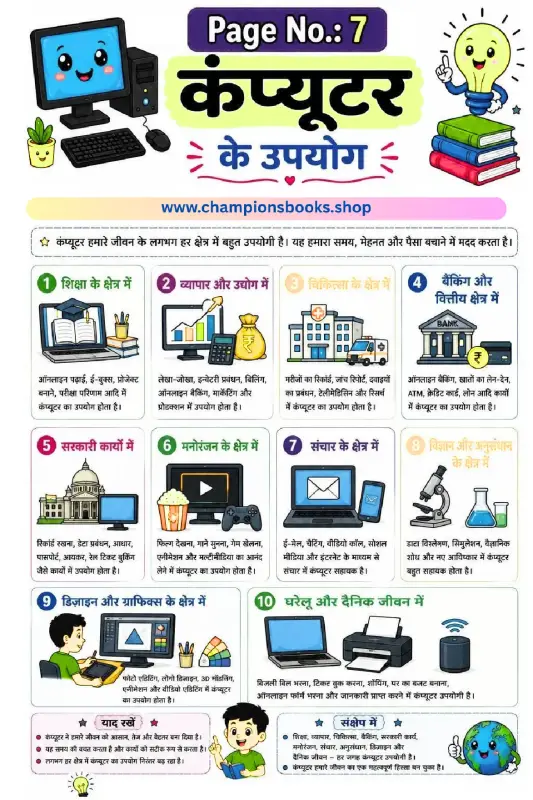
Uses of Computer in Hindi Worksheet for Kids | Grade 3
About this Worksheet: Uses of Computer in Hindi This colorful and engaging educational worksheet is designed to teach Grade 3 students about the various uses of computer (कंप्यूटर के उपयोग) in our daily lives and different professional fields. It features 10 distinct areas where computers play a vital role, accompanied by clear illustrations and simple Hindi text to make learning both fun and easy. Key Learning Areas Covered शिक्षा के क्षेत्र में (Education): Online learning, e-books, and school projects. व्यापार और उद्योग (Business & Industry): Billing, accounting, and inventory management. चिकित्सा के क्षेत्र में (Medicine): Managing patient records and medical research. बैंकिंग और वित्तीय क्षेत्र (Banking & Finance): Online banking and ATM transactions. सरकारी कार्यों में (Government Work): Record keeping, passports, and railway bookings. मनोरंजन के क्षेत्र में (Entertainment): Movies, music, and video games. संचार के क्षेत्र में (Communication): Emails, video calls, and social media. विज्ञान और अनुसंधान (Science & Research): Data analysis and scientific discoveries. डिजाइन और ग्राफिक्स (Design & Graphics): Photo editing, 3D modeling, and video editing. घरेलू और दैनिक जीवन में (Daily Life): Bill payments, online shopping, and home budgeting. Benefits for Grade 3 Students Enhances vocabulary in both Hindi and basic computer terminology. Develops a strong foundational understanding of modern technology and its applications. Visual aids and colorful illustrations help in better retention and engagement for young learners.
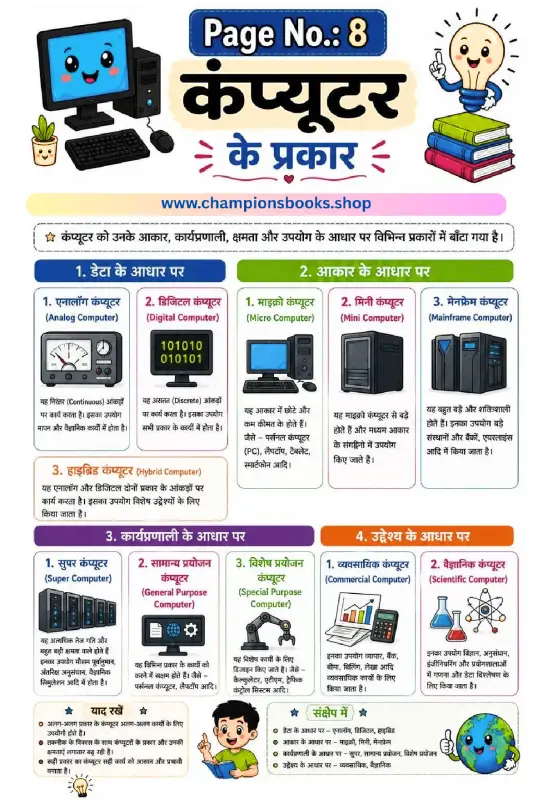
Types of Computer in Hindi Worksheet | Computer ke Prakar
About this Worksheet: Types of Computer in Hindi This educational worksheet, titled "कंप्यूटर के प्रकार" (Types of Computer in Hindi), is designed specifically for primary school students to help them understand how computers are classified. It serves as an excellent visual guide for young learners to grasp fundamental computer science concepts in a simple, bilingual format (Hindi and English). Key Classifications Covered The worksheet breaks down the classification of computers into four main categories based on different criteria: Based on Data (डेटा के आधार पर): Introduces students to Analog Computers, Digital Computers, and Hybrid Computers with clear visual examples. Based on Size (आकार के आधार पर): Explains the differences between Micro Computers (like PCs and smartphones), Mini Computers, and large Mainframe Computers. Based on Working Principle (कार्यप्रणाली के आधार पर): Covers high-performance Super Computers, as well as General Purpose and Special Purpose Computers. Based on Purpose (उद्देश्य के आधार पर): Differentiates between Commercial Computers used in business and Scientific Computers used in research. Learning Benefits for Students By using this colorful and engaging worksheet, students will achieve several learning milestones: Understand basic computer terminology in both Hindi and English. Learn to identify different types of computer systems based on their real-world applications. Enhance critical thinking by comparing capabilities, sizes, and purposes of various computing devices. Build a strong foundational knowledge of computer science from an early grade level. This resource is perfect for teachers, homeschooling parents, and students looking to reinforce their computer literacy skills in an intuitive, visual manner.
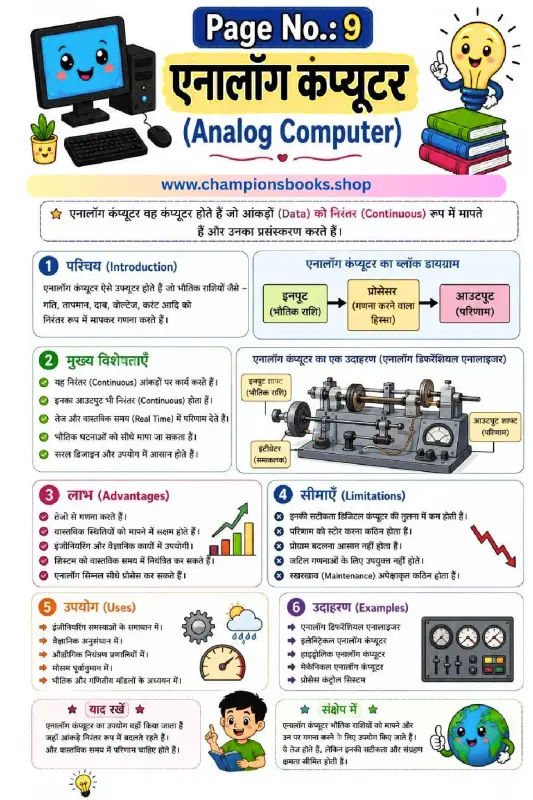
Learn Analog Computer in Hindi - Types, Features & Uses
About this Analog Computer Worksheet This educational worksheet is specifically designed to help Grade 5 students easily grasp the fundamental concepts of an Analog Computer in Hindi (एनालॉग कंप्यूटर). With engaging colorful illustrations, clear block diagrams, and simplified explanations, young learners can effortlessly understand how analog computers measure and process continuous physical data such as speed, temperature, pressure, voltage, and electrical current. Key Learning Benefits By studying this comprehensive Hindi-medium computer science chart, students will explore several vital topics: Definition and Introduction: Learn how analog computers differ from digital ones by processing continuous physical quantities. Detailed Block Diagram: Understand the flow of data from Input (physical quantity) to Processor (calculation) and finally to Output (result). Core Features & Advantages: Discover why these systems are highly valued for real-time results, high-speed calculations, and direct physical measurements. Limitations: Understand their lower accuracy compared to digital computers and the challenges of storing data. Practical Applications & Examples: Explore real-life uses in weather forecasting, industrial control, and scientific research, alongside examples like the Analog Differential Analyzer. Why Use This Hindi Computer Science Guide? Learning technical subjects in Hindi helps students build a stronger foundational understanding. This Analog Computer in Hindi worksheet breaks down complex engineering concepts into easy-to-read bullet points, making it an excellent resource for school teachers, parents, and students looking for quick revision materials.
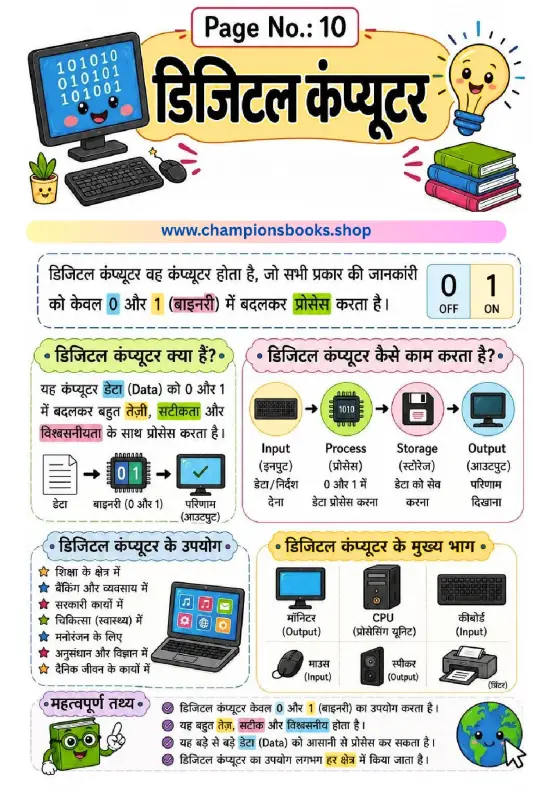
Digital Computer Worksheet in Hindi for Primary Students
About this Digital Computer Worksheet in Hindi Introduce primary school kids to the fascinating world of technology with our colorful Digital Computer Worksheet in Hindi. Designed specifically for young learners, this educational sheet simplifies complex computing concepts like binary language, data processing, and basic computer components in an easy-to-understand Hindi format. Key Concepts Covered This worksheet provides a comprehensive overview of how digital computers function, including: What is a Digital Computer? (डिजिटल कंप्यूटर क्या हैं?): Explaining how computers process data using binary digits 0 and 1 (Off and On). How it Works: Visual representation of the Input, Process, Storage, and Output cycle (इनपुट, प्रोसेस, स्टोरेज, आउटपुट). Parts of a Computer: Identifying crucial hardware components such as the Monitor, CPU, Keyboard, Mouse, Speaker, and Printer. Uses of Computers: Highlighting applications in education, banking, healthcare, entertainment, and research. Learning Benefits Bilingual Understanding: Helps children connect English computer terminology with clear Hindi explanations. Visual Learning: Vibrant illustrations make learning about binary codes and computer parts engaging and memorable. Cognitive Skills: Promotes logical thinking by explaining the step-by-step processing of data. Whether you are a teacher looking for classroom resources or a parent homeschooling your child, this digital computer worksheet serves as an excellent teaching aid. It breaks down technical jargon into bite-sized, child-friendly information that sparks curiosity about technology and computer science.
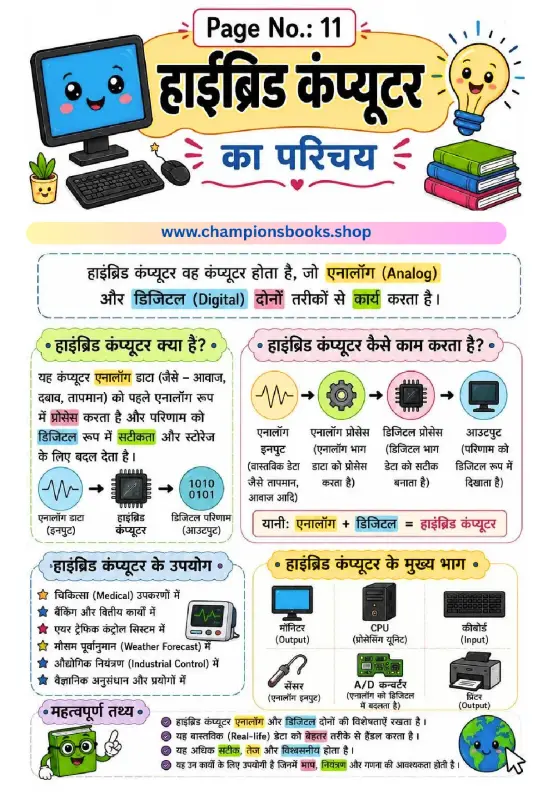
Hybrid Computer in Hindi: Definition, Parts & Uses
About this Worksheet: Introduction to Hybrid Computer This educational worksheet is designed to introduce young learners to the concept of a hybrid computer in Hindi (“हाईब्रिड कंप्यूटर का परिचय”). Ideal for primary school students, this colorful visual guide explains how hybrid systems blend the features of both analog and digital computers to perform complex tasks efficiently. What is a Hybrid Computer? A hybrid computer (हाईब्रिड कंप्यूटर) is a unique system that processes both analog data (like temperature, pressure, and sound) and digital data (numbers and codes). It takes analog inputs, processes them, and converts the results into digital output for high accuracy and easy storage. Key Features & Learning Benefits Dual Functionality: Understand how analog and digital components work together (Analog + Digital = Hybrid). Step-by-Step Working: Learn the data flow from analog input, processing, to digital output clearly. Real-World Applications: Discover where hybrid computers are used, such as in medical equipment, weather forecasting, and air traffic control. Main Components: Identify key parts like the CPU, monitor, sensor, keyboard, printer, and A/D converter (Analog to Digital Converter). Why Use This Worksheet? This worksheet makes computer science concepts highly accessible for Hindi-medium students. With clear illustrations, color-coded sections, and simple Hindi explanations, children can easily grasp complex technical terms, making it a perfect resource for classroom teaching or home study.
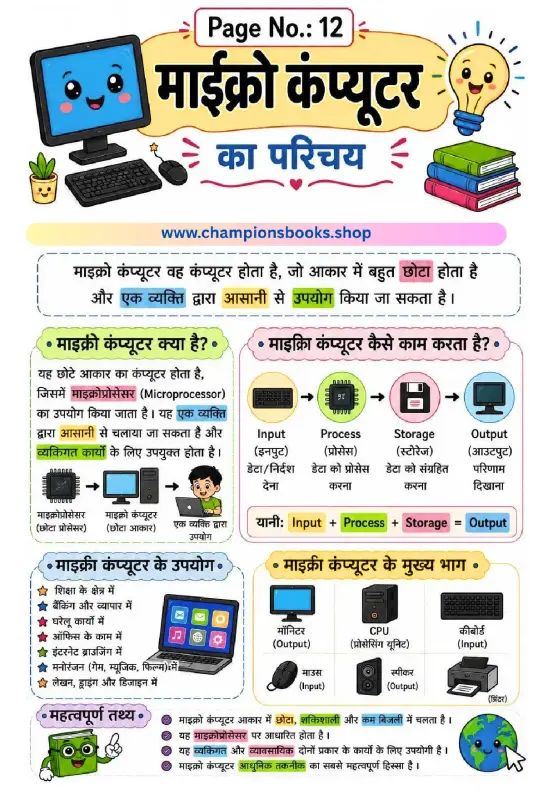
Microcomputer Worksheet in Hindi | Introduction to Computers
This colorful and engaging microcomputer worksheet in hindi is designed specifically for primary school students to introduce them to the world of computers. With vibrant illustrations and clear, simple Hindi text, children can easily grasp the foundational concepts of modern technology. It serves as an excellent teaching aid for parents and teachers alike. About this Worksheet This worksheet provides a comprehensive introduction to microcomputers, explaining their definition, how they function, their main components, and their everyday uses. By breaking down complex technical terms into simple Hindi descriptions, it helps young learners build a strong foundation in computer science. Key Concepts Covered Definition of Microcomputer: Understand what a microcomputer is and how it utilizes a microprocessor for individual tasks. The Computer Cycle: A clear, visual flowchart representing the Input, Process, Storage, and Output cycle. Main Parts of a Computer: Identification of essential hardware components including the Monitor, CPU, Keyboard, Mouse, Speaker, and Printer. Practical Applications: Real-world examples of where microcomputers are used, such as in education, banking, home, office, and entertainment. Learning Benefits Bilingual Understanding: Connects standard Hindi terms with their English technical vocabulary (e.g., Input/इनपुट, Process/प्रोसेस). Visual Learning: Bright, kid-friendly graphics keep students engaged and help them retain information more effectively. Cognitive Development: Encourages logical thinking by explaining how data is processed within a computer system.
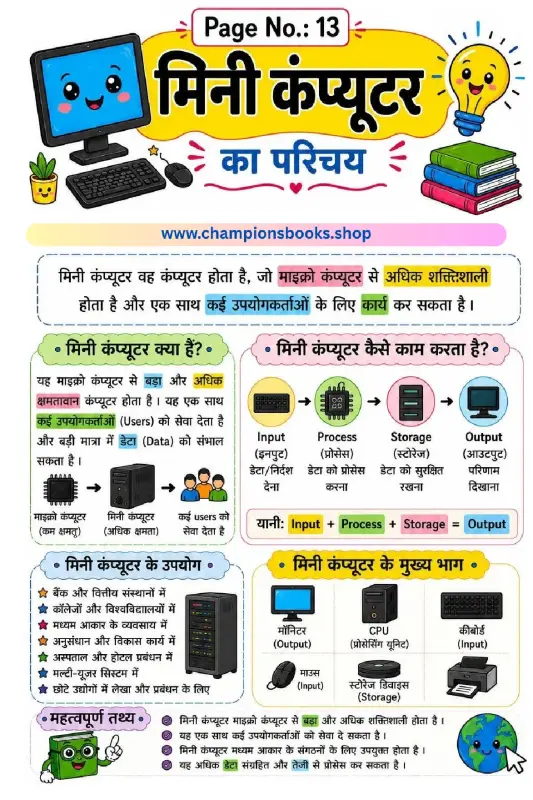
Mini Computer in Hindi - मिनी कंप्यूटर का परिचय Worksheet
About this Worksheet: मिनी कंप्यूटर का परिचय This educational worksheet is designed to introduce young learners to the concept of a Mini Computer in Hindi. Specially crafted for elementary school students, this colorful study guide explains what a mini computer is, how it functions, and where it is used in daily life. With clear diagrams and simplified Hindi text, children can easily grasp complex computer science concepts. Learning Benefits and Key Topics Covered This worksheet serves as an excellent teaching resource for parents and educators to teach basic computer architecture. Here are the key topics covered in this guide: What is a Mini Computer? (मिनी कंप्यूटर क्या है): Learn how it is more powerful than a microcomputer and supports multiple users simultaneously. How it Works: A simple breakdown of the Input, Process, Storage, and Output cycle. Main Components: Identification of key parts like the Monitor, CPU, Keyboard, Mouse, Storage Device, and Printer. Uses of Mini Computers: Real-world applications in banks, colleges, medium-sized businesses, hospitals, and research facilities. Why Use This Hindi Computer Worksheet? Introducing technology concepts in a native language helps students build a stronger foundational understanding. This worksheet uses visual aids, color-coded highlights, and an engaging layout to keep students interested. The "Important Facts" (महत्वपूर्ण तथ्य) section at the bottom provides a quick summary, perfect for revision before exams or quizzes.
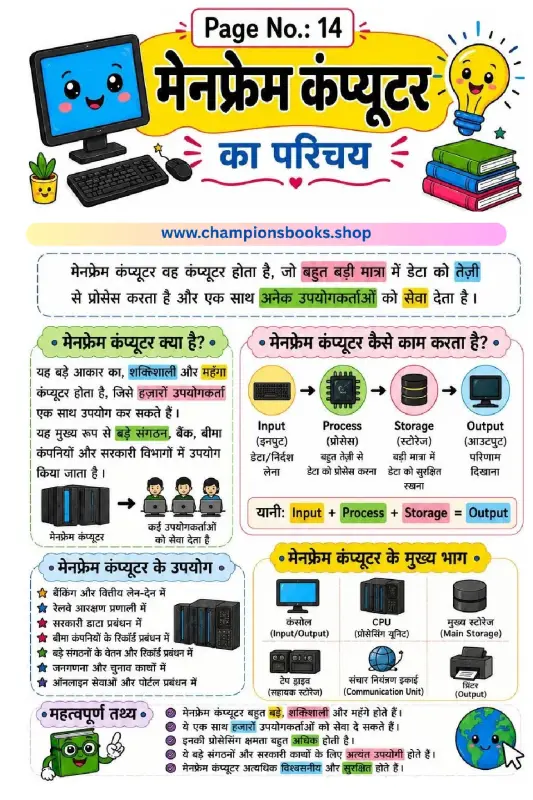
Learn Mainframe Computer Worksheet in Hindi for Class 4
About this Worksheet Introduce your elementary students to advanced technology with our engaging Mainframe Computer Worksheet in Hindi. Tailored specifically for Grade 4 students, this high-quality educational resource simplifies complex computer science concepts into easy-to-understand Hindi text, supported by colorful illustrations and clear diagrams. It is an excellent resource for Hindi-medium schools and bilingual learners looking to strengthen their computer literacy. Learning Benefits This worksheet serves as a comprehensive guide to understanding large-scale computing systems. Here are the key learning outcomes: Concept of Mainframes: Kids will learn what a mainframe computer is, highlighting its immense processing power, size, and cost. The Computing Cycle: Visual flowcharts teach the fundamental cycle of Input, Process, Storage, and Output in a simple, memorable way. Key Hardware Components: Introduces vital parts of a mainframe system including the Console, CPU, Main Storage, Tape Drive, Communication Unit, and Printer. Real-World Applications: Helps students connect theory to real life by showcasing how mainframes are used in banking, railway reservations, census operations, and government databases. Interactive Classroom Features Vibrant Visuals: Keeps young learners engaged with cute computer characters and clear icons. Key Facts Summary: Includes a "महत्वपूर्ण तथ्य" (Important Facts) section for quick revision and exam preparation. Bilingual Advantage: Helps students learn technical computer terms in both Hindi and English.
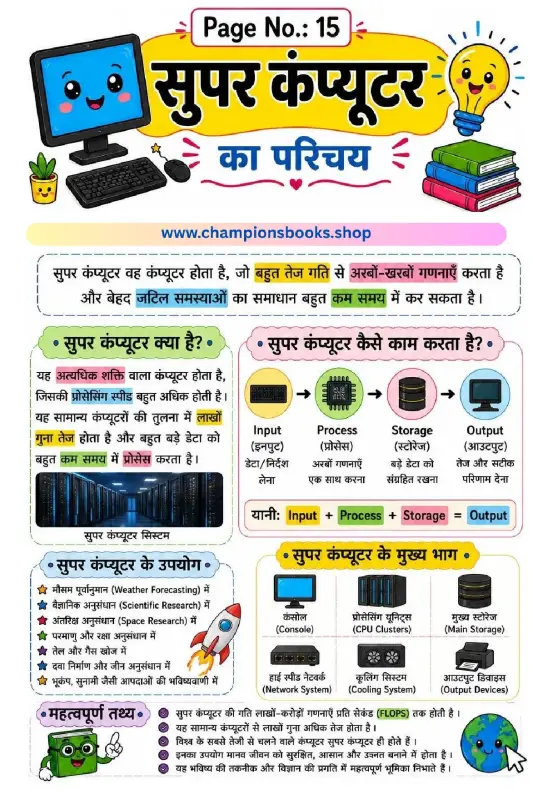
Super Computer in Hindi: Introduction & Uses Worksheet
About this Worksheet This educational worksheet is designed to introduce young learners to the fascinating world of supercomputers. Written in clear, easy-to-understand Hindi, "सुपर कंप्यूटर का परिचय" (Introduction to Supercomputer) helps students grasp advanced computer science concepts with engaging visuals and structured diagrams. It is an excellent resource for classrooms, homeschooling, and computer science clubs. Key Learning Benefits Easy Comprehension: Complex technology concepts are explained using simple Hindi terminology and clear diagrams. Visual Learning: Features engaging illustrations detailing the input-process-storage-output cycle and key supercomputer components. Real-World Connections: Helps students understand how supercomputers assist in global scientific advancement. What is Covered in this Guide? What is a Supercomputer? Understanding its high-speed processing capabilities and how it differs from normal PCs. How it Works: A step-by-step flowchart showing the Input, Process, Storage, and Output stages. Major Components: Introduction to CPU clusters, main storage, cooling systems, and console units. Important Uses: Real-world applications like weather forecasting (मौसम पूर्वानुमान), space research (अंतरिक्ष अनुसंधान), and medicine. Fascinating Facts: Fun facts like measuring supercomputer speed in FLOPS (Floating-Point Operations Per Second).
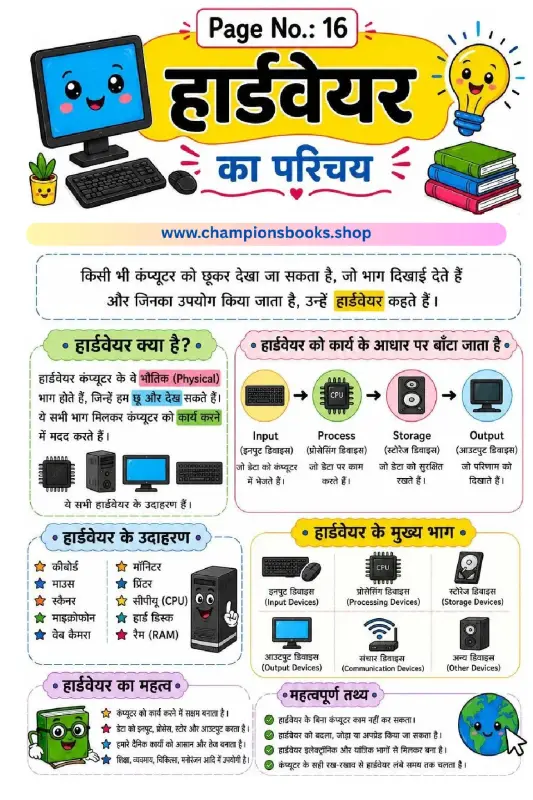
Learn Computer Hardware in Hindi - Class 3 Worksheet
About this Computer Hardware in Hindi Worksheet This educational worksheet is specifically designed to introduce young learners to the fundamental concepts of computer hardware in Hindi. Perfect for Class 3 students, this colorful and engaging page helps children understand the physical components of a computer that they can see and touch. What Students Will Learn This comprehensive worksheet covers all the essential aspects of computer hardware, making it easy for kids to grasp basic computer science concepts. Key topics include: Definition of Hardware: Simple explanations of physical computer parts (भौतिक भाग) that can be touched and seen. Functional Classification: Understanding how hardware is divided into Input, Process, Storage, and Output devices. Real-world Examples: Clear illustrations of common hardware components like keyboards, mice, monitors, printers, CPUs, and scanners. Importance of Hardware: Learning why hardware is vital for computer operations and how it makes daily tasks faster and easier. Fun Facts: Interesting trivia about upgrading hardware and proper maintenance tips. Learning Benefits for Grade 3 Students Using visual worksheets is an excellent way to enhance cognitive learning in children. By studying this computer hardware guide, students will build a strong foundation in digital literacy. The bilingual terminology (Hindi and English) ensures that learners can easily bridge the gap between both languages while identifying computer parts in real life. This resource is ideal for classroom teaching, homeschooling, or quick revision before exams.
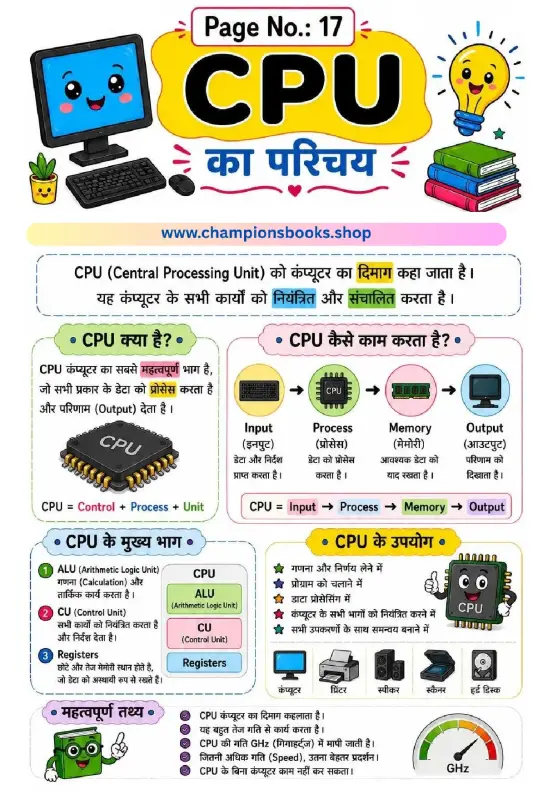
CPU Introduction in Hindi Worksheet for Kids | Grade 3
Introduce Kids to the Brain of the Computer (CPU) Help young learners master the basics of computer science with our colorful and engaging CPU Introduction in Hindi worksheet. Designed specifically for primary school students, this educational resource explains the core concepts of a Central Processing Unit (CPU) in simple, easy-to-understand Hindi language. Key Learning Concepts Covered This worksheet serves as an excellent visual guide to help children grasp how computers process information. It covers several fundamental topics: What is a CPU? (CPU क्या है?): Explains why the CPU is known as the brain of the computer and how it processes data to deliver output. How CPU Works: A step-by-step visual workflow showing the relationship between Input, Process, Memory, and Output. Main Parts of CPU: Clear definitions of ALU (Arithmetic Logic Unit), CU (Control Unit), and Registers. Uses and Functions: Highlights how the CPU controls all connected devices like printers, speakers, and scanners. Fun Facts: Explains CPU speed measurement in GHz (Gigahertz) in a kid-friendly manner. Benefits for Students and Teachers Whether you are a parent homeschooling your child or a school teacher planning a computer applications class, this worksheet is a perfect teaching aid. The vibrant illustrations and clear Hindi text keep kids engaged while building a strong foundation in digital literacy and technology basics. How to Use This Worksheet Download and print this high-quality worksheet for classroom activities, homework assignments, or quick revision sessions. Encourage students to read the Hindi text aloud and label their own computer diagrams to reinforce their learning. It's an ideal resource for bilingual learners taking their first steps into the world of technology!
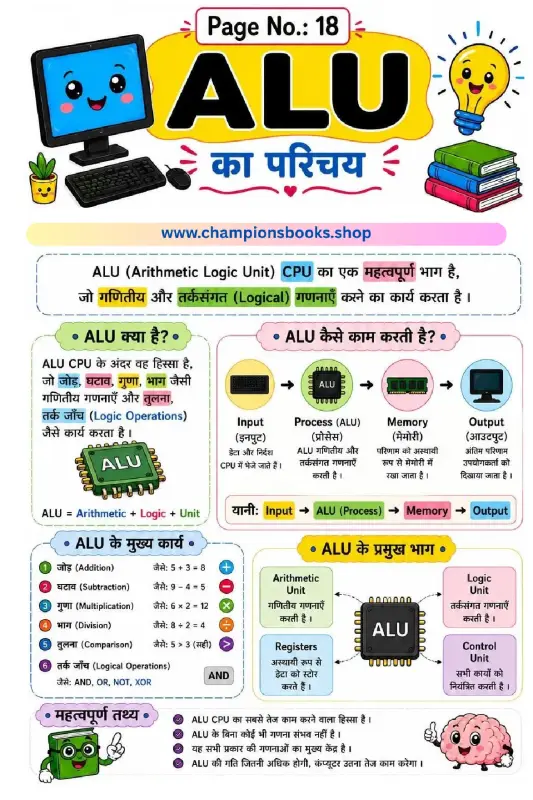
What is ALU in Computer? Educational Hindi Worksheet
About this Worksheet Introduce young learners to the core of computer processing with our engaging ALU in Computer educational worksheet. Designed specifically for primary school students (Grade 4), this colorful Hindi-medium guide simplifies complex computer hardware concepts into easy-to-understand visual diagrams. It is an excellent resource for teachers and parents looking to build a strong foundation in computer science. What is an Arithmetic Logic Unit (ALU)? The Arithmetic Logic Unit (ALU) is a critical component of the Central Processing Unit (CPU). Often described as the calculator of the computer, the ALU is responsible for performing all mathematical computations and logical decision-making processes that keep our devices running smoothly. Key Learning Benefits and Features Data Flow Visualization: Kids will learn how information travels through a computer system via the clear Input → Process (ALU) → Memory → Output cycle diagram. Mathematical Operations: Understands how computers execute basic arithmetic functions like Addition, Subtraction, Multiplication, and Division. Logical Reasoning: Explains how computers compare data using logical operations such as AND, OR, NOT, and XOR. Anatomy of the ALU: Highlights the four main pillars of the processing unit: the Arithmetic Unit, Logic Unit, Registers, and Control Unit. Bilingual Learning: Uses a mix of Hindi and English terminology to help students transition easily to advanced computer science topics. Why Use This Worksheet? With vibrant illustrations and child-friendly explanations, this worksheet turns dry technical concepts into an interactive visual learning experience. It helps students understand that without the ALU, a computer cannot perform any calculations or execute logical commands!
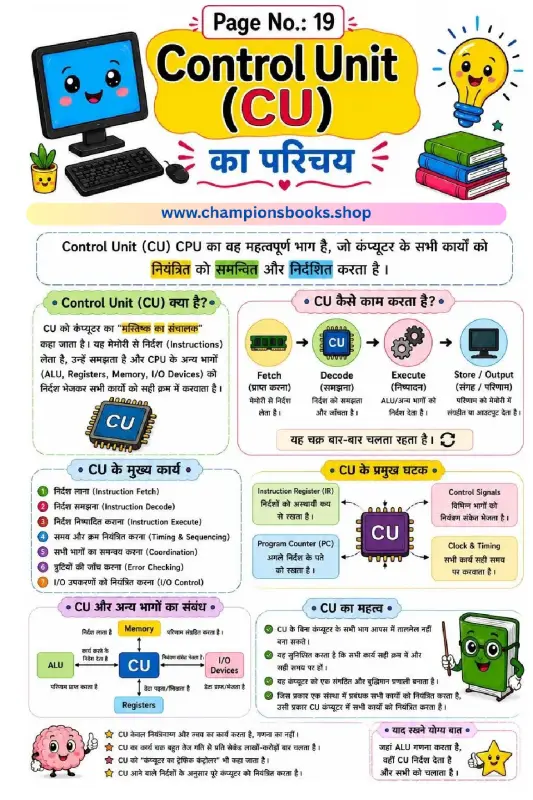
Computer Control Unit Worksheet: Learn CU Basics in Hindi
About this Worksheet Introduce young learners to the core of computer processing with our engaging Computer Control Unit Worksheet. Designed specifically for elementary students, this worksheet explains the concept of the Control Unit (CU) as the 'conductor' of the computer's brain. Written in clear, easy-to-understand Hindi with standard English technical terms, it provides a perfect foundation in computer science basics. Key Learning Concepts This worksheet breaks down complex computer architecture into simplified, visual segments, covering: What is a Control Unit (CU)?: Understanding how the CU manages, coordinates, and directs all activities of a computer. The CU Working Cycle: A step-by-step visual representation of the Fetch, Decode, Execute, and Store process. Main Functions of the CU: Learn about instruction fetching, timing and sequencing, error checking, and I/O device control. Key Components: Introduction to the Instruction Register (IR), Program Counter (PC), Control Signals, and Clock & Timing. System Interconnection: How the CU interacts with the ALU, Memory, Registers, and Input/Output devices. Learning Benefits for Kids Using this worksheet offers several educational advantages for elementary students: Visual Diagrams: The colorful flowcharts and illustrations help children visualize how data moves inside a CPU. Bilingual Learning: Dual-language explanations (Hindi and English) ensure children grasp complex technical terms easily. Logical Thinking: Encourages logical thinking by showing how step-by-step instructions are processed in a cycle. How to Use This Worksheet in the Classroom Teachers and parents can use this Computer Control Unit Worksheet to introduce basic CPU architecture. Start by explaining the analogy of a school principal or traffic controller (as highlighted in the sheet) to help children relate to the CU's role. Follow up with a fun quiz asking students to list the four stages of the CU cycle in order!
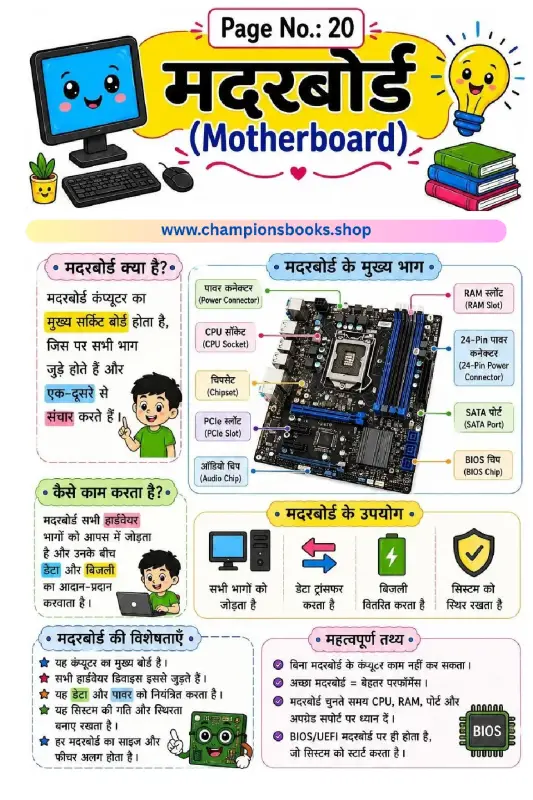
Learn Computer Motherboard Worksheet in Hindi | Grade 4
About this Computer Motherboard Worksheet Introduce young learners to the heart of the computer with our colorful and educational computer motherboard worksheet in hindi. Designed specifically for Grade 4 students, this visually engaging chart breaks down complex hardware concepts into simple, easy-to-understand Hindi terms. It is the perfect resource for teachers and parents to teach kids how a computer's main circuit board operates. Key Learning Benefits Interactive Learning: Beautifully labeled diagrams of motherboard parts like CPU Socket, RAM Slot, and BIOS Chip keep students engaged. Bilingual Understanding: Terms are presented in both Hindi and English to build strong vocabulary in both languages. Conceptual Clarity: Explains how a motherboard functions, distributes electricity, and transfers data between components. Quick Facts: Includes a dedicated section with important facts about motherboard performance and system stability. What this Worksheet Covers This comprehensive worksheet covers essential topics about computer hardware, including: What is a Motherboard? (मदरबोर्ड क्या है?): Understanding the main circuit board of a computer. Main Parts of a Motherboard: Visual identification of the Power Connector, Chipset, SATA Port, and PCIe Slot. How it Works (कैसे काम करता है?): Explaining the flow of data and power across hardware devices. Features & Importance: Why a computer cannot function without a motherboard and how it maintains system stability.
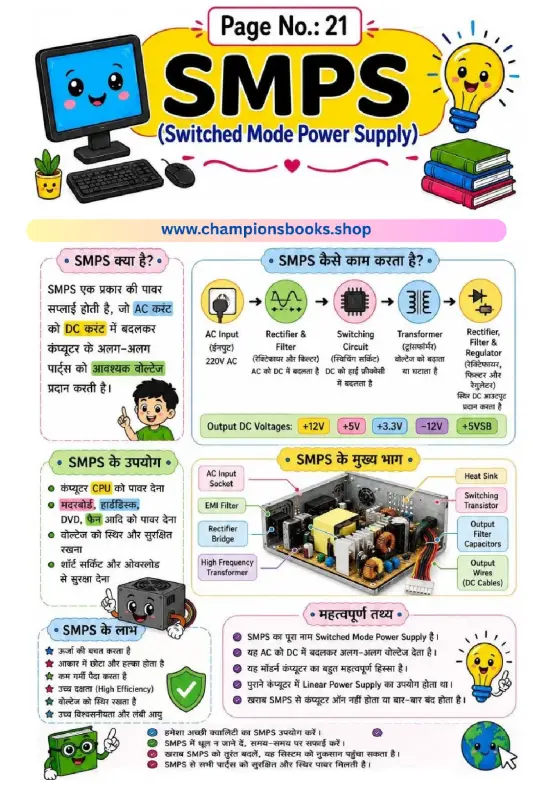
SMPS Computer Parts Worksheet in Hindi for Grade 5
About this SMPS Computer Parts Worksheet This highly engaging and colorful educational worksheet is specifically designed for Grade 5 students learning about computer hardware in Hindi. It provides a comprehensive, visual, and easy-to-understand breakdown of an SMPS (Switched Mode Power Supply), helping young learners grasp complex electrical and computer engineering concepts in their native language. Key Learning Sections Covered This worksheet serves as an excellent study guide by dividing the topic of computer power supplies into digestible sections: What is SMPS (SMPS क्या है?): An introductory explanation of how the device converts Alternating Current (AC) to Direct Current (DC) to power various internal computer components safely. Working Mechanism (SMPS कैसे काम करता है?): A clear step-by-step block diagram showcasing the flow from AC Input (220V) through the Rectifier, Switching Circuit, Transformer, and Regulator to deliver precise output DC voltages (+12V, +5V, +3.3V, etc.). Main Components (SMPS के मुख्य भाग): A labeled diagram pointing out essential hardware parts such as the EMI Filter, Heat Sink, High-Frequency Transformer, and Output Wires. Uses and Benefits (SMPS के उपयोग और लाभ): Real-world applications like protecting the motherboard and CPU from overload, and advantages such as high energy efficiency and lightweight design. Why Use This Worksheet? Integrating this SMPS computer parts worksheet in Hindi into your curriculum or home-schooling routine helps students build technical vocabulary, understand fundamental hardware operations, and prepare for advanced computer science topics. It is perfect for classroom activities, quick revisions, and homework assignments.
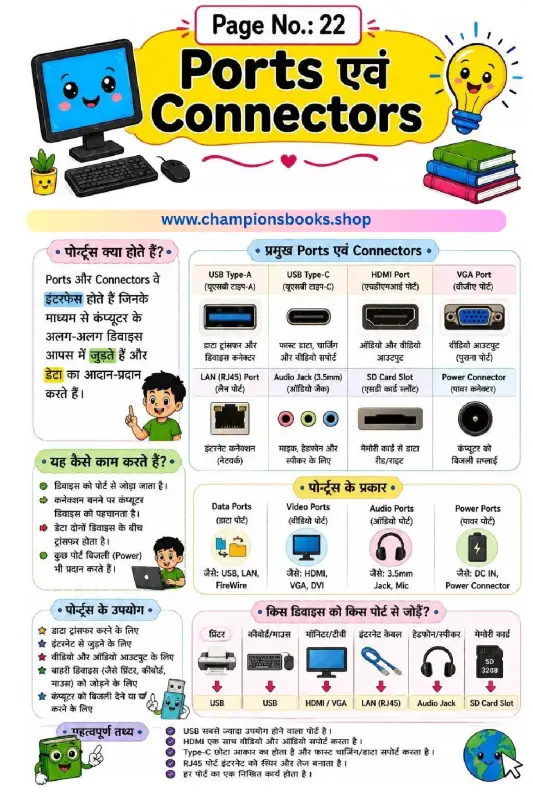
Computer Ports and Connectors in Hindi - Grade 3 Worksheet
About this Computer Ports and Connectors Worksheet This educational worksheet is designed to teach Grade 3 students about essential computer hardware components: Computer Ports and Connectors in Hindi. With colorful illustrations and easy-to-understand bilingual explanations, young learners can quickly grasp how different devices connect to a computer system to transfer data and power. Key Learning Topics Covered What are Ports? (पोर्ट्स क्या होते हैं?): Learn how ports act as interfaces to connect external devices and transfer data. How Ports Work: Understand the connection process and data transfer mechanism between devices. Types of Ports: Discover the classification into Data Ports, Video Ports, Audio Ports, and Power Ports. Major Connectors: Visual identification of USB Type-A, USB Type-C, HDMI, VGA, LAN (RJ45), Audio Jack, and SD Card Slots. Device Compatibility: Practical guide on which device (printer, keyboard, monitor, headphones) connects to which specific port. Benefits of this Worksheet Learning about computer hardware at an early age builds a strong foundation in computer literacy. This worksheet offers several key benefits: Bilingual Learning: Explanations are provided in Hindi with English terms, making it highly accessible for Hindi-medium students. Visual Reinforcement: High-quality, cute illustrations help children easily identify physical ports on their school or home computers. Practical Knowledge: Students learn real-world applications, such as how to connect a mouse, keyboard, or monitor. Fun and Interactive Computer Science Study Guide Whether used in the classroom or for homeschooling, this worksheet serves as an excellent study guide. It simplifies complex technical terms into digestible, kid-friendly facts, such as how USB is the most widely used port and how HDMI supports both video and audio transmission. Perfect for Grade 3 computer science lessons!
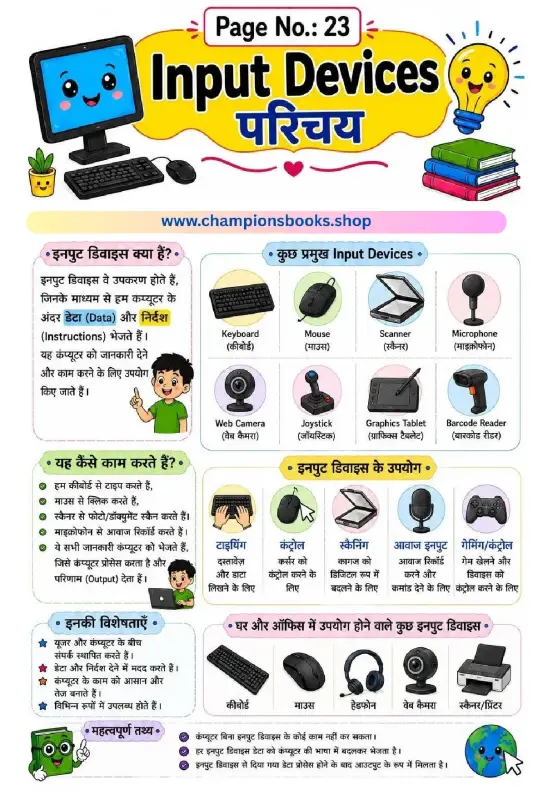
Computer Input Devices in Hindi | Kids Learning Chart
About this Input Devices in Hindi Worksheet Introduce young learners to the basics of computer science with our engaging Computer Input Devices in Hindi educational worksheet. Designed specifically for elementary school students (Grade 3 to Grade 5), this visually appealing chart helps children understand how we interact with computers using various input tools. The worksheet features clear Hindi explanations alongside colorful illustrations of common devices like the keyboard, mouse, scanner, and microphone. Key Learning Benefits Concept Clarity: Clearly explains what input devices are (इनपुट डिवाइस क्या हैं?) and how they send data and instructions to the computer. Visual Identification: Helps kids easily identify 8 major input devices including Keyboard, Mouse, Scanner, Microphone, Web Camera, Joystick, Graphics Tablet, and Barcode Reader. Practical Knowledge: Demonstrates real-world uses such as typing, controlling cursors, scanning documents, recording voice, and gaming. Bilingual Support: Features terms in both Hindi and English script to build a stronger technical vocabulary. Worksheet Features Highly interactive layout with cute graphics to keep children engaged. Easy-to-understand bullet points highlighting the main characteristics (विशेषताएँ) of input devices. "Important Facts" (महत्वपूर्ण तथ्य) section to reinforce critical concepts, like why a computer cannot function without input devices. Perfect for classroom teaching, homeschooling, or self-study. How to Use This Worksheet Teachers and parents can use this chart to initiate an interactive discussion about computer hardware. Ask students to point out the input devices they use at home or in the school lab. This resource serves as an excellent reference sheet for homework, computer science quizzes, and classroom displays.
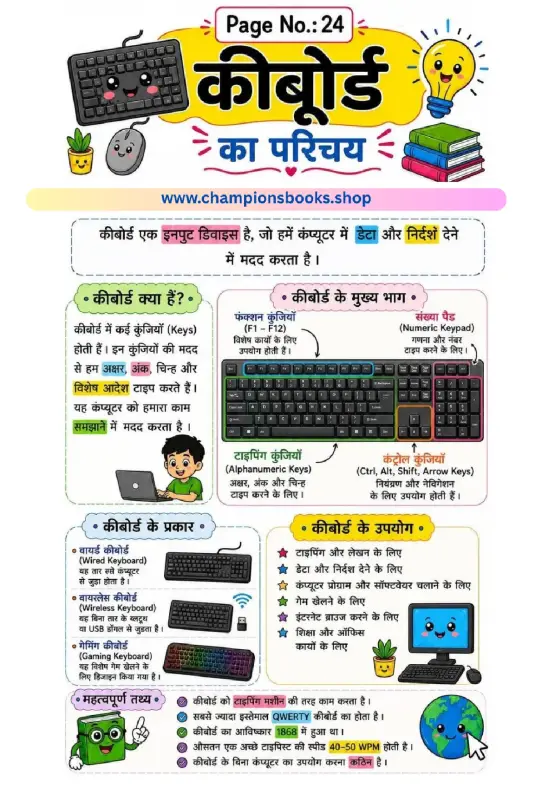
Computer Keyboard Worksheet in Hindi for Grade 2
This colorful and engaging Computer Keyboard Worksheet in Hindi is designed specifically for Grade 2 students to help them understand the basics of computer hardware. Written in simple Hindi, this educational chart makes it easy for young learners to grasp how a keyboard works as an essential input device. About this Worksheet Our Keyboard Introduction Worksheet in Hindi ("कीबोर्ड का परिचय") serves as an excellent visual aid for classrooms and home study. It introduces children to the fundamental concept of the keyboard, explaining how we use various keys to type letters, numbers, and special commands to communicate with a computer. Key Learning Benefits Interactive Visuals: Colorful illustrations of wired, wireless, and gaming keyboards keep young minds engaged. Bilingual Understanding: Helps children associate Hindi terms with standard English computer terminology (e.g., Input Device, Alphanumeric Keys). Foundational Tech Skills: Builds early computer literacy, preparing Grade 2 students for modern digital learning. What is Covered in this Chart? Introduction to Keyboard: Clear definition of the keyboard as an input device. Main Parts of a Keyboard: Detailed breakdown of Alphanumeric Keys, Function Keys (F1-F12), Control Keys, and the Numeric Keypad. Types of Keyboards: Introduction to wired, wireless, and specialized gaming keyboards. Practical Uses: How a keyboard is used for typing, gaming, web browsing, and office work. Fun Facts: Interesting trivia including the invention of the QWERTY keyboard layout in 1868 and average typing speeds. Download this high-quality worksheet today to make computer science fun and accessible for your primary school students!