

Information Technology (IT) Worksheets
Information Technology (IT) Worksheets — Creative, engaging, and educational worksheets designed to help students learn essential computer and technology concepts through fun practice activities.
Worksheets
Found 60 worksheet(s) — Page 1 of 3
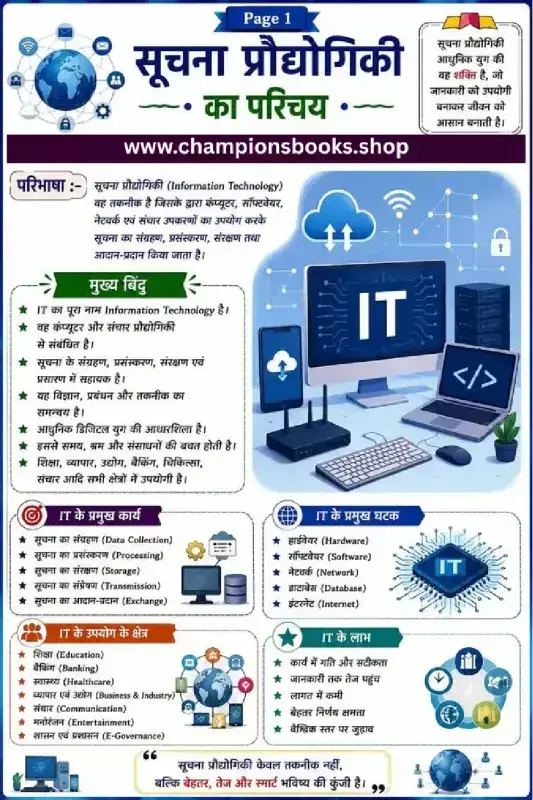
Information Technology Notes in Hindi | Class 9 IT Guide
About this Worksheet This comprehensive study guide on Information Technology Notes in Hindi (सूचना प्रौद्योगिकी का परिचय) is designed specifically for school students, particularly in Grade 9, who are studying computer science and IT in Hindi medium. It serves as a visual infographic and educational chart that simplifies complex digital concepts into easy-to-understand points, making it an excellent resource for classroom learning, homework help, and quick exam revision. Key Learning Areas Covered This educational poster breaks down the vast subject of Information Technology into structured, easy-to-digest sections: IT Definition (परिभाषा): A clear explanation of how computers, software, networks, and communication devices work together to store, process, protect, and transmit digital information. Major Functions of IT (IT के प्रमुख कार्य): An overview of essential data operations including Data Collection, Processing, Storage, Transmission, and Exchange. Core Components (IT के प्रमुख घटक): Introduction to the essential pillars of modern computing—Hardware, Software, Network, Database, and the Internet. Applications of IT (IT के उपयोग के क्षेत्र): Real-world applications of technology across diverse sectors such as Education, Banking, Healthcare, Business, Entertainment, and E-Governance. Key Benefits (IT के लाभ): Visual representation of how IT improves efficiency through speed, accuracy, cost reduction, better decision-making, and global connectivity. Learning Benefits for Students By studying this Information Technology Notes in Hindi chart, students can easily grasp foundational computer science concepts. The bilingual approach—presenting Hindi explanations alongside standard English technical terms—ensures that learners build a robust vocabulary. This structure is highly beneficial for Hindi-medium students preparing for board exams or competitive tests in computer applications.
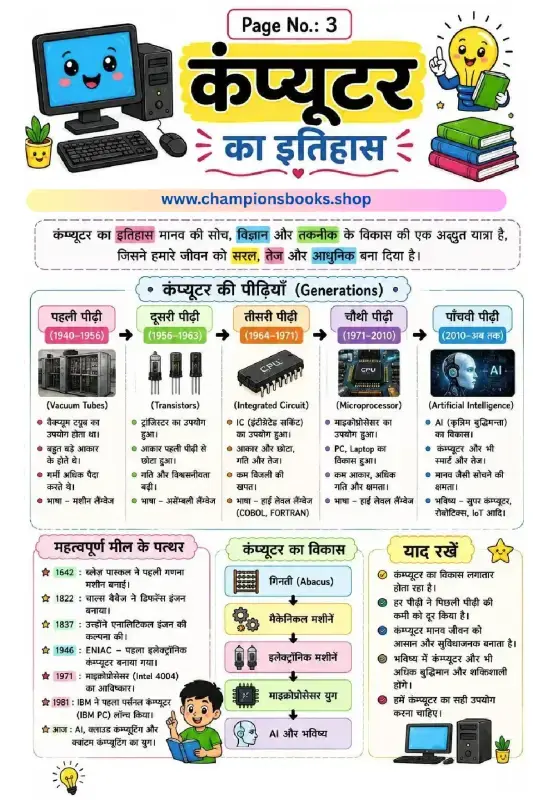
History of Computer in Hindi - कंप्यूटर का इतिहास Worksheet
About this Worksheet इस educational worksheet के माध्यम से बच्चे कंप्यूटर का इतिहास (History of Computer in Hindi) और उसके विकास की अद्भुत यात्रा को आसानी से समझ सकते हैं। यह वर्कशीट प्राथमिक कक्षाओं (Grade 3) के छात्रों के लिए विशेष रूप से डिज़ाइन की गई है, जिसमें रंगीन चित्रों और सरल हिंदी भाषा का उपयोग किया गया है। इसमें कंप्यूटर की विभिन्न पीढ़ियों (Generations of Computers) से लेकर महत्वपूर्ण ऐतिहासिक मील के पत्थरों (Milestones) तक की पूरी जानकारी दी गई है। Key Learning Areas कंप्यूटर की पीढ़ियाँ (Generations of Computers): पहली पीढ़ी (Vacuum Tubes) से लेकर पाँचवीं पीढ़ी (Artificial Intelligence) तक का क्रमिक सफर और उनकी विशेषताएँ। महत्वपूर्ण मील के पत्थर (Milestones): ब्लेज़ पास्कल (1642) से लेकर आधुनिक AI, क्लाउड कंप्यूटिंग और क्वांटम कंप्यूटिंग तक के प्रमुख आविष्कार। कंप्यूटर का विकास (Evolution): Abacus (गिनती) से लेकर मैकेनिकल, इलेक्ट्रॉनिक, माइक्रोप्रोसेसर युग और भविष्य की तकनीक। याद रखने योग्य बातें: कंप्यूटर के विकास से जुड़ी महत्वपूर्ण बातें जो बच्चों के सामान्य ज्ञान को बढ़ाती हैं। Learning Benefits for Kids सरल और स्पष्ट भाषा: हिंदी माध्यम के छात्रों के लिए कंप्यूटर विज्ञान के बुनियादी सिद्धांतों को समझना बेहद आसान बनाता है। दृश्य शिक्षण (Visual Learning): आकर्षक चित्रों के साथ बच्चे प्रत्येक पीढ़ी के मुख्य घटकों जैसे ट्रांसिस्टर, आईसी, और माइक्रोप्रोसेसर को आसानी से पहचान सकते हैं। ज्ञान में वृद्धि: यह बच्चों में तकनीकी सोच, ऐतिहासिक समझ और कंप्यूटर के प्रति रुचि को विकसित करने में मदद करता है।
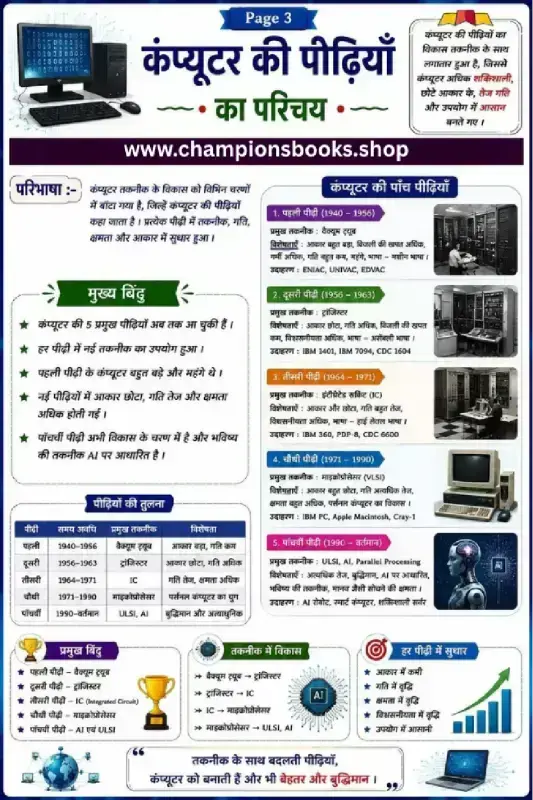
Generations of Computer in Hindi Chart & Worksheet
About this Worksheet This educational worksheet, titled 'कंप्यूटर की पीढ़ियाँ का परिचय' (Introduction to Generations of Computers), is designed for students in Grade 5 to 8 to learn the evolutionary history of computers in Hindi. It provides a structured, visually engaging overview of how computer technology has advanced from massive, slow machines to fast, intelligent systems. Learning Benefits By studying this chart, students will develop a strong foundation in computer science history. Key learning outcomes include: Understanding the 5 distinct generations of computer technology from 1940 to the present day. Learning about key components like Vacuum Tubes, Transistors, Integrated Circuits (IC), Microprocessors (VLSI), and Artificial Intelligence (ULSI/AI). Comparing features such as size, speed, cost, and reliability across different eras. Familiarizing with historical computer examples like ENIAC, IBM 360, and modern AI systems. Features of the Chart Clear Timeline: Covers the period from 1940 to the present and future. Comparison Table: A handy reference table summarizing all five generations for quick revision and exam prep. Visual Aids: High-quality illustrations representing each era of computing technology. Hindi Medium Friendly: Explanations are written in simple, easy-to-understand Hindi, making it ideal for bilingual and Hindi-medium students. How to Use This Resource This worksheet is perfect for teachers, educators, and parents. You can use it as a classroom poster, a study guide for exams, or an interactive homework activity to reinforce computer science fundamentals at home.
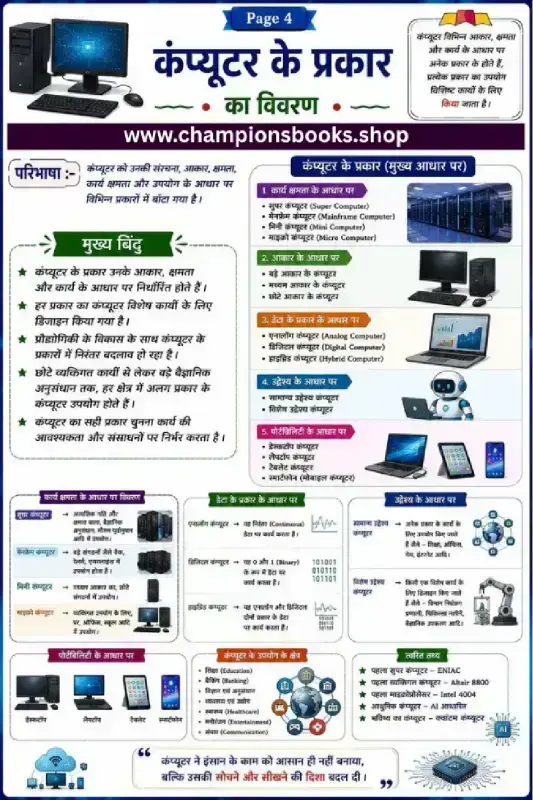
Types of Computers in Hindi | कंप्यूटर के प्रकार Worksheet
About this Worksheet This educational worksheet is designed for Grade 5 students to learn and understand the types of computers in Hindi (कंप्यूटर के प्रकार). It provides a comprehensive visual classification of computers based on work capacity, size, data handling, purpose, and portability. This resource is perfect for Hindi-medium school curriculums, computer science basics, and home study. Key Classifications Covered The chart breaks down the complex classification of computers into clear, easy-to-understand categories: Based on Capacity (कार्य क्षमता के आधार पर): Detailed explanations of Super Computers, Mainframe Computers, Mini Computers, and Micro Computers. Based on Size (आकार के आधार पर): Categorization into large, medium, and small-sized computer systems. Based on Data Handling (डेटा के प्रकार के आधार पर): Clear distinctions between Analog, Digital, and Hybrid computers. Based on Purpose (उद्देश्य के आधार पर): Understanding General Purpose versus Special Purpose systems. Based on Portability (पोर्टेबिलिटी के आधार पर): Modern daily-use devices including Desktops, Laptops, Tablets, and Smartphones. Learning Benefits Visual Mind Maps: Helps students easily memorize classifications through structured diagrams and real-world examples. Bilingual Terminology: Bridges Hindi explanations with standard English technical terms (e.g., Mainframe, Hybrid). Quick Facts (त्वरित तथ्य): Includes interesting trivia about historical milestones like ENIAC and early microprocessors to boost student engagement. Real-world Applications: Describes where each type of computer is used, from weather forecasting to daily office work.
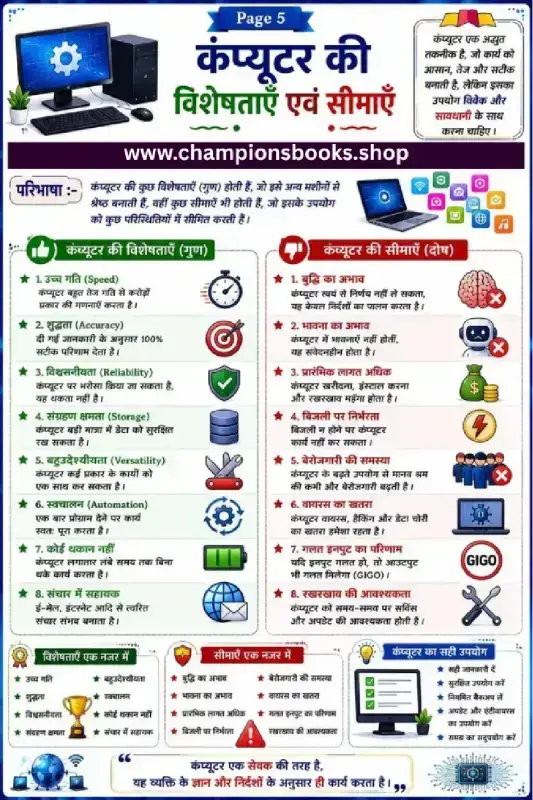
Computer Characteristics and Limitations in Hindi Worksheet
कंप्यूटर की विशेषताएँ और सीमाएँ (Characteristics and Limitations of Computer) यह शैक्षणिक वर्कशीट प्राथमिक विद्यालय के छात्रों को कंप्यूटर की विशेषताएँ (Characteristics) और उसकी सीमाएँ (Limitations) को सरल और स्पष्ट हिंदी भाषा में समझाने के लिए डिज़ाइन की गई है। कंप्यूटर आज के युग की एक अत्यंत महत्वपूर्ण तकनीक है, लेकिन इसकी अपनी खूबियों के साथ-साथ कुछ सीमाएँ भी होती हैं। कंप्यूटर की मुख्य विशेषताएँ (Features of Computer) कंप्यूटर में कई ऐसे गुण होते हैं जो इसे इंसानों और अन्य मशीनों से अधिक कुशल बनाते हैं: उच्च गति (Speed): कंप्यूटर पलक झपकते ही करोड़ों जटिल गणनाएँ कर सकता है। शुद्धता (Accuracy): कंप्यूटर बिना किसी गलती के हमेशा 100% सटीक परिणाम देता है। विश्वसनीयता (Reliability): इस पर भरोसा किया जा सकता है क्योंकि यह कभी थकता नहीं है। संग्रहण क्षमता (Storage): यह बड़ी मात्रा में डेटा और महत्वपूर्ण फाइलों को सुरक्षित रख सकता है। बहुउद्देशीयता (Versatility): यह एक ही समय में कई अलग-अलग प्रकार के कार्य कर सकता है। स्वचालन (Automation): एक बार प्रोग्राम सेट करने के बाद यह कार्य स्वतः पूरा कर लेता है। कंप्यूटर की सीमाएँ (Limitations of Computer) अद्भुत विशेषताओं के बावजूद, कंप्यूटर की कुछ कमजोरियाँ और सीमाएँ भी हैं: बुद्धि का अभाव (No IQ): कंप्यूटर के पास अपना दिमाग नहीं होता, यह केवल इंसानों द्वारा दिए गए निर्देशों पर चलता है। भावना का अभाव (No Feelings): कंप्यूटर में कोई भावना या संवेदना नहीं होती है। बिजली पर निर्भरता: यह बिना बिजली या बैटरी बैकअप के काम नहीं कर सकता। गलत इनपुट का परिणाम (GIGO): यदि हम इसे गलत निर्देश (Input) देंगे, तो यह गलत परिणाम (Output) ही देगा। इस वर्कशीट के मुख्य लाभ (Learning Benefits) बुनियादी समझ: कक्षा 3 से 5 के बच्चों को कंप्यूटर के बेसिक सिद्धांतों से परिचित कराता है। रोचक चित्र: रंगीन ग्राफिक्स और उदाहरणों के माध्यम से विषय को समझना आसान बनता है। जागरूकता: बच्चों को कंप्यूटर के सही और सुरक्षित उपयोग के बारे में सिखाता है।
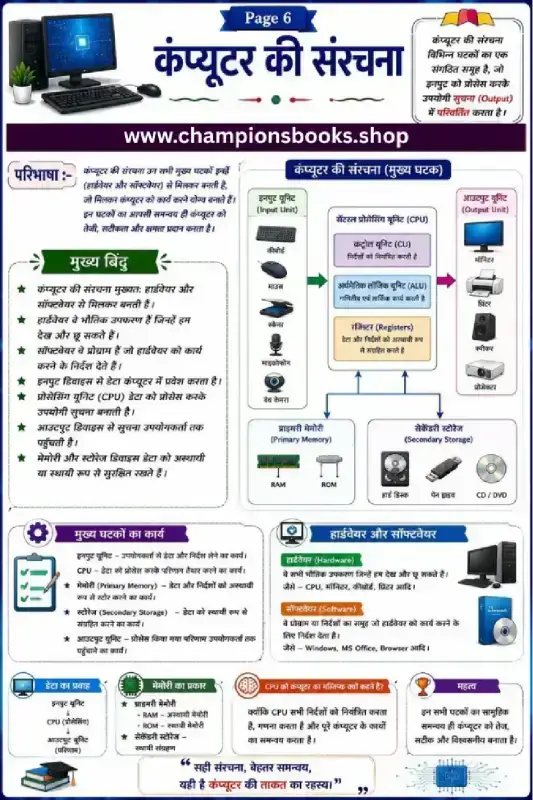
Computer Structure in Hindi Worksheet | Grade 6 Computer
About this Computer Structure Worksheet This comprehensive educational worksheet is designed for Grade 6 students to understand the fundamental components and architecture of a computer system in Hindi. Entitled "कंप्यूटर की संरचना" (Structure of Computer), this visual study guide breaks down complex hardware and software concepts into easy-to-understand diagrams and definitions, making it an ideal resource for Hindi-medium classrooms and home study. Key Learning Concepts Covered This worksheet provides a detailed breakdown of the computer's core components and their functions: Input Unit (इन्पुट यूनिट): Introduction to devices used to enter data, including the keyboard, mouse, scanner, microphone, and web camera. Central Processing Unit (CPU): Explains why the CPU is considered the brain of the computer, detailing the roles of the Control Unit (CU), Arithmetic Logic Unit (ALU), and Registers. Output Unit (आउटपुट यूनिट): Explores how processed information is displayed or produced using monitors, printers, speakers, and projectors. Memory and Storage (मेमोरी और स्टोरेज): Differentiates between Primary Memory (RAM, ROM) and Secondary Storage (Hard Disk, Pen Drive, CD/DVD). Hardware vs. Software: Defines physical components (Hardware) and instructional programs (Software) with clear examples. Benefits for Students and Teachers Clear Visual Flowcharts: The diagrammatic representation of data flow helps students easily visualize how input travels through the CPU to become output. Exam-Focused Summary: Key points (मुख्य बिंदु) and component functions (मुख्य घटकों का कार्य) serve as excellent quick-revision notes. Bilingual Terminology: Helps Hindi-medium students learn essential English technical terms alongside their Hindi translations.
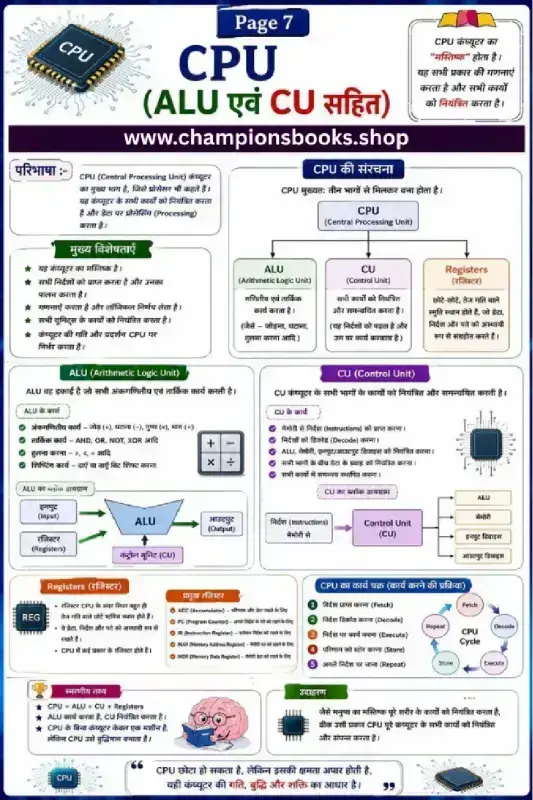
CPU Parts and Functions Worksheet in Hindi - Grade 6-8
About this Worksheet This comprehensive CPU Parts and Functions Worksheet in Hindi is designed to help Grade 6 to 8 students master the core concepts of computer architecture. The worksheet provides a detailed visual breakdown of the Central Processing Unit (CPU), including the Arithmetic Logic Unit (ALU), Control Unit (CU), and Registers. With clear diagrams and simplified Hindi explanations, it serves as an excellent study guide for young learners. Learning Benefits Students using this educational resource will develop a strong foundation in computer hardware concepts. Key learning objectives include: Understanding CPU Structure: Learn how the CPU acts as the brain of the computer and coordinates all operations. ALU Functions: Discover how the Arithmetic Logic Unit performs mathematical calculations and logical decisions. Control Unit (CU) Operations: Understand how the CU directs traffic and manages instructions between input, output, and memory devices. Memory Registers: Learn about temporary storage units like Accumulators and Program Counters. CPU Working Cycle: Grasp the five essential steps of the CPU cycle: Fetch, Decode, Execute, Store, and Repeat. Features of the Worksheet This study material is designed for effective learning and retention: Bilingual Terminology: Important technical terms are presented in both Hindi and English to build strong computer vocabulary. Visual Diagrams: Clear block diagrams for both ALU and CU help students visualize data flow. Quick Revision Points: A dedicated section for remembering facts makes exam preparation quick and easy. Whether you are a teacher looking for classroom resources or a parent supporting home learning, this computer basics worksheet is a valuable tool to make complex concepts simple and engaging.
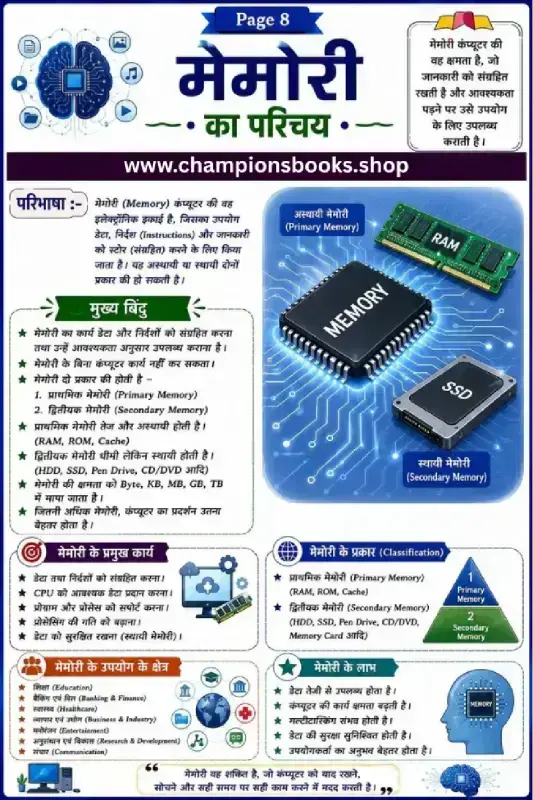
Computer Memory Worksheet in Hindi | Learn RAM & SSD
About this Computer Memory Worksheet This educational Computer Memory Worksheet in Hindi is designed specifically for Grade 5 students to introduce them to the fundamental concepts of computer storage. With colorful diagrams and easy-to-understand Hindi text, this worksheet makes learning about computer hardware engaging, simple, and highly interactive for young minds taking their first steps into computer science. Key Learning Concepts Covered This study guide and worksheet provides a comprehensive overview of how computers store, retrieve, and process information. Students will explore essential topics including: Definition of Memory (मेमोरी की परिभाषा): Understanding how computers store data, instructions, and information for processing. Primary Memory (अस्थायी मेमोरी): Learning about high-speed, temporary storage devices like RAM, ROM, and Cache memory. Secondary Memory (स्थायी मेमोरी): Discovering permanent storage solutions such as SSD, HDD, Pen Drives, and CD/DVDs. Memory Measurement Units: An introduction to storage capacity measurements ranging from Bytes to KB, MB, GB, and TB. Benefits of Using this Worksheet Using visual aids to teach abstract computer science concepts is highly effective for primary school learners. Key benefits include: Clear Classification: Easy-to-follow diagrams help students distinguish between primary and secondary storage without confusion. Real-world Applications: Explains how computer memory is utilized across daily sectors like education, banking, healthcare, and entertainment. Cognitive Development: Encourages logical thinking as kids connect hardware components to computer performance and multitasking capabilities.
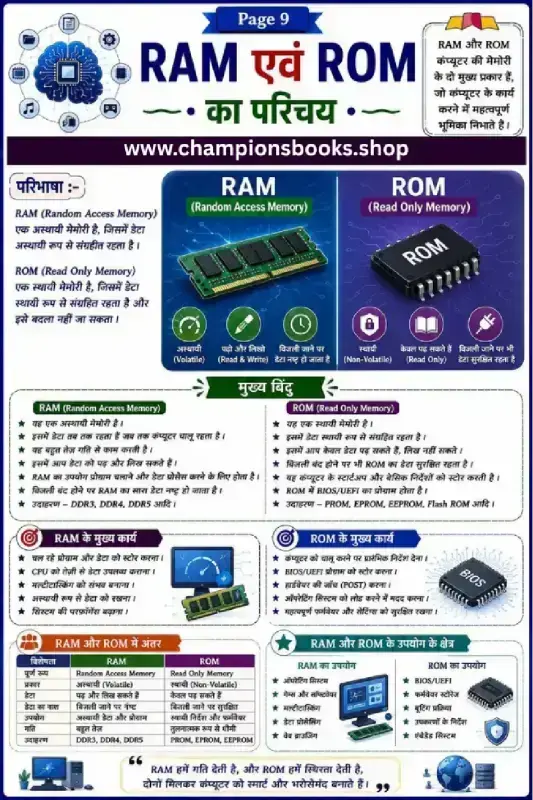
RAM and ROM Difference in Hindi: Computer Memory Worksheet
This educational worksheet is designed to help Grade 5 students easily understand the core concepts of computer memory, specifically the RAM and ROM difference in Hindi. Written in clear and accessible Hindi, it serves as an excellent study guide and practice sheet for young learners. About this Worksheet This worksheet provides a comprehensive introduction to Computer Memory (कंप्यूटर की मेमोरी). It explains the two primary types of memory—RAM (Random Access Memory) and ROM (Read Only Memory)—using colorful illustrations, comparative tables, and easy-to-understand definitions in Hindi. Key Learning Points RAM (Random Access Memory): Understand why it is called temporary (अस्थायी) or volatile memory and how it speeds up active computer tasks. ROM (Read Only Memory): Learn about permanent (स्थायी) or non-volatile memory and its role in storing startup instructions (BIOS/UEFI). Key Differences (अंतर): A detailed comparison table highlighting differences based on speed, data retention, capacity, and usage. Practical Applications: Real-world examples of where RAM and ROM are utilized in operating systems, gaming, and firmware storage. Benefits for Students and Teachers Whether you are a teacher looking for a classroom resource or a parent helping your child study computer science at home, this worksheet is highly beneficial because: It breaks down complex technical jargon into simple, child-friendly Hindi. The visual layout makes it easy to memorize the key differences between volatile and non-volatile memory. It is perfectly aligned with the elementary school computer science curriculum (Grade 5).
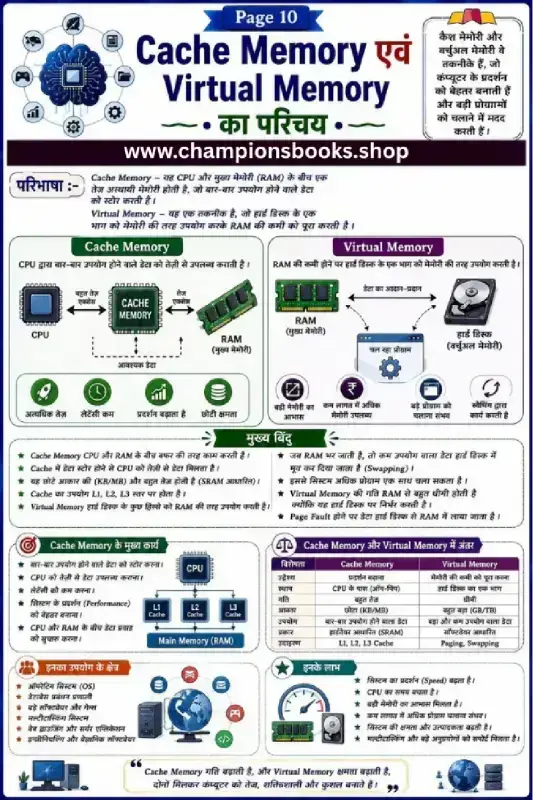
Cache Memory and Virtual Memory Hindi Worksheet
About this Worksheet This comprehensive Cache Memory and Virtual Memory Hindi Worksheet is designed to help students easily understand fundamental computer memory concepts. Written in clear Hindi, this educational infographic serves as an excellent study guide for middle and high school students learning computer science. It visually explains how the CPU interacts with Cache Memory, RAM, and Virtual Memory to optimize computer performance. Whether you are a teacher looking for a high-quality visual aid or a student preparing for exams, this worksheet simplifies technical jargon. It uses clear icons and structured bullet points to explain how cache levels (L1, L2, L3) work and how virtual memory acts as an extension of RAM during heavy multitasking. Key Concepts Covered This resource breaks down complex hardware concepts into easy-to-digest sections: Definitions: Clear, simplified explanations of Cache Memory and Virtual Memory in Hindi. Visual Diagrams: Step-by-step flowcharts showing data movement between CPU, RAM, and Hard Disks. Key Differences: A detailed comparison table highlighting speed, size, cost, and storage types. Applications & Benefits: Real-world usage scenarios like operating systems, database management, and high-end gaming. Learning Benefits Helps students grasp the difference between hardware-based and software-based memory management. Enhances technical vocabulary in both Hindi and English (bilingual terms). Improves understanding of computer performance factors like latency, speed, and swapping. Perfect for classroom teaching, quick revision, or homework assignments.
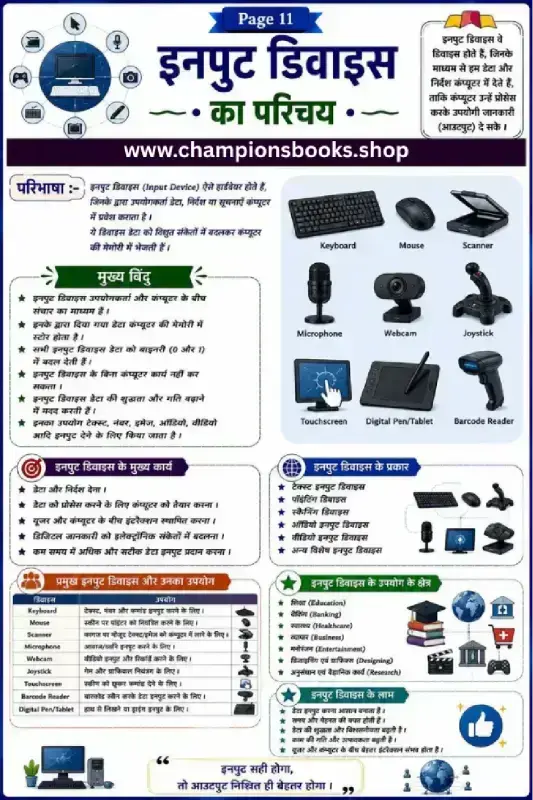
Computer Input Devices Worksheet in Hindi | Grade 4
About this Computer Input Devices Worksheet This educational worksheet, titled "इन्पुट डिवाइस का परिचय" (Introduction to Input Devices), is designed specifically for Grade 4 students to help them grasp the fundamental concepts of computer hardware in Hindi. It provides a comprehensive visual and textual guide to understanding how we interact with computers using various input tools. Key Learning Concepts Covered This worksheet is packed with essential information about computer peripherals, making it an excellent resource for classroom teaching or home study. Key topics include: Definition of Input Devices: Understanding how hardware devices transmit data, instructions, and information into the computer's memory. Core Functions: Learning how input devices convert user actions into binary language (0 and 1) for the computer to process. Common Examples: Visual identification and explanation of devices like the Keyboard, Mouse, Scanner, Microphone, Webcam, Joystick, Touchscreen, Barcode Reader, and Digital Pen/Tablet. Classification of Devices: Categorizing inputs into text, pointing, scanning, audio, and video formats. Benefits of Using this Worksheet Using this structured Hindi medium worksheet offers several educational advantages for young learners: Bilingual Familiarity: Helps students learn technical computer terms in both Hindi and English simultaneously. Real-World Applications: Shows how input devices are used across various sectors like Education, Banking, Healthcare, Business, and Entertainment. Enhanced Computer Literacy: Builds a strong foundational understanding of how computer systems receive and process information, boosting overall digital literacy.
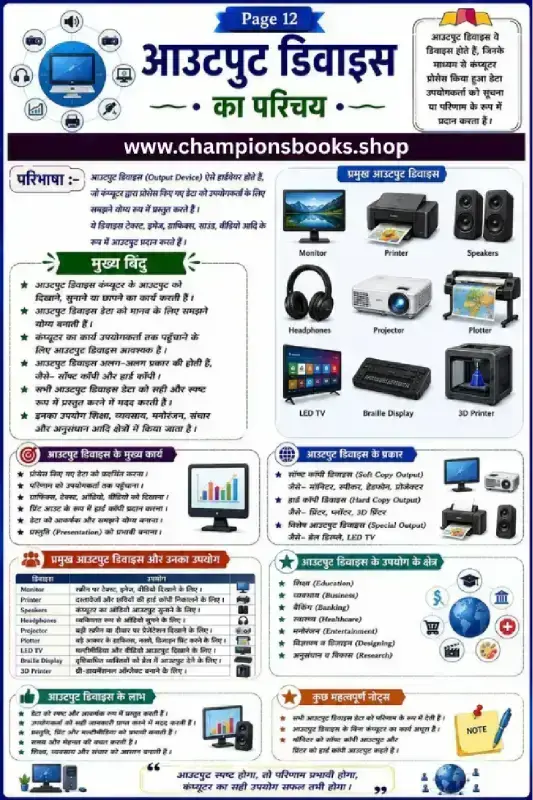
Output Devices in Hindi - आउटपुट डिवाइस की जानकारी
कंप्यूटर आउटपुट डिवाइस की पूरी जानकारी (Output Devices in Hindi) यह शैक्षणिक वर्कशीट छात्रों को कंप्यूटर आउटपुट डिवाइस (Output Devices) के बारे में विस्तृत और सरल भाषा में जानकारी प्रदान करती है। इस चार्ट की मदद से बच्चे विभिन्न प्रकार के आउटपुट उपकरणों को आसानी से पहचान और समझ सकते हैं। यह विशेष रूप से प्राथमिक और माध्यमिक कक्षाओं के कंप्यूटर विज्ञान पाठ्यक्रम के लिए अत्यंत उपयोगी है। आउटपुट डिवाइस क्या हैं? (What are Output Devices?) आउटपुट डिवाइस वे हार्डवेयर उपकरण होते हैं जो कंप्यूटर द्वारा प्रोसेस किए गए डेटा को उपयोगकर्ता के समझने योग्य रूप में प्रस्तुत करते हैं। ये जानकारी को टेक्स्ट, इमेज, ग्राफिक्स, साउंड या वीडियो के रूप में प्रदर्शित करते हैं। वर्कशीट की मुख्य विशेषताएं (Key Features of the Worksheet) प्रमुख आउटपुट डिवाइस: मॉनिटर (Monitor), प्रिंटर (Printer), स्पीकर (Speakers), हेडफोन (Headphones), प्रोजेक्टर (Projector), और प्लॉटर (Plotter) जैसे उपकरणों का सचित्र परिचय। वर्गीकरण: सॉफ्ट कॉपी आउटपुट (जैसे मॉनिटर, स्पीकर) और हार्ड कॉपी आउटपुट (जैसे प्रिंटर, 3D प्रिंटर) का स्पष्ट विभाजन। उपयोग के क्षेत्र: शिक्षा, व्यवसाय, बैंकिंग, स्वास्थ्य, और अनुसंधान के क्षेत्रों में इनके महत्व की जानकारी। लाभ और कार्य: आउटपुट उपकरणों के मुख्य कार्य और उनके लाभों को आसान बिंदुओं में समझाया गया है। सीखने के लाभ (Learning Benefits) छात्रों को कंप्यूटर हार्डवेयर के महत्वपूर्ण हिस्से की पहचान करने में मदद मिलती है। सॉफ्ट कॉपी और हार्ड कॉपी के बीच के अंतर को स्पष्ट रूप से समझने में सहायक। परीक्षा की तैयारी और कंप्यूटर प्रोजेक्ट्स के लिए एक उत्कृष्ट शिक्षण सामग्री।
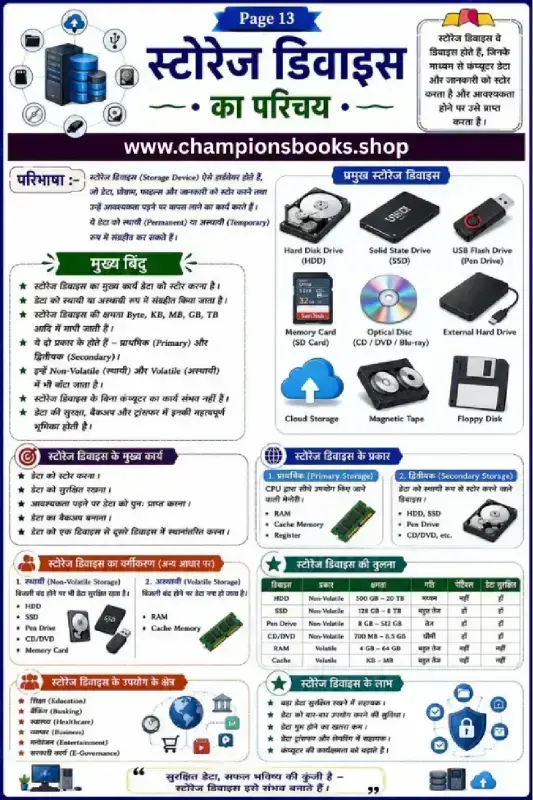
Computer Storage Devices in Hindi - Class 5 Worksheet
About this Computer Storage Devices Worksheet This comprehensive educational chart and worksheet introduces young learners to the fundamental concepts of Computer Storage Devices in Hindi (स्टोरेज डिवाइस का परिचय). Specifically designed for Grade 5 computer science curriculum, this highly visual guide simplifies complex hardware concepts into easy-to-understand Hindi explanations, making it an excellent resource for school teachers, parents, and students. Key Learning Topics Covered This worksheet serves as a complete study guide covering all essential aspects of computer memory: What is a Storage Device?: Simple definition explaining how hardware stores data, files, and programs either permanently or temporarily. Types of Storage Devices: Visual identification of Hard Disk Drives (HDD), Solid State Drives (SSD), USB Flash Drives (Pen Drive), SD Cards, Optical Discs (CD/DVD), Cloud Storage, and Magnetic Tapes. Primary vs. Secondary Storage: Understand the difference between CPU-direct memory (RAM, Cache, Registers) and secondary storage devices. Volatile vs. Non-Volatile Memory: Learn how permanent storage keeps data secure even when power is turned off, unlike volatile memory. Detailed Comparison Matrix: A helpful comparison table analyzing capacity, speed, portability, and safety across various storage media. Learning Benefits for Grade 5 Students By engaging with this educational chart, students will develop a strong foundation in IT literacy. Key benefits include: Conceptual Clarity: Easily differentiate between temporary and permanent memory types. Bilingual Vocabulary: Master English technical terms alongside clear Hindi explanations. Critical Thinking: Analyze and compare different storage devices based on speed, safety, and capacity.
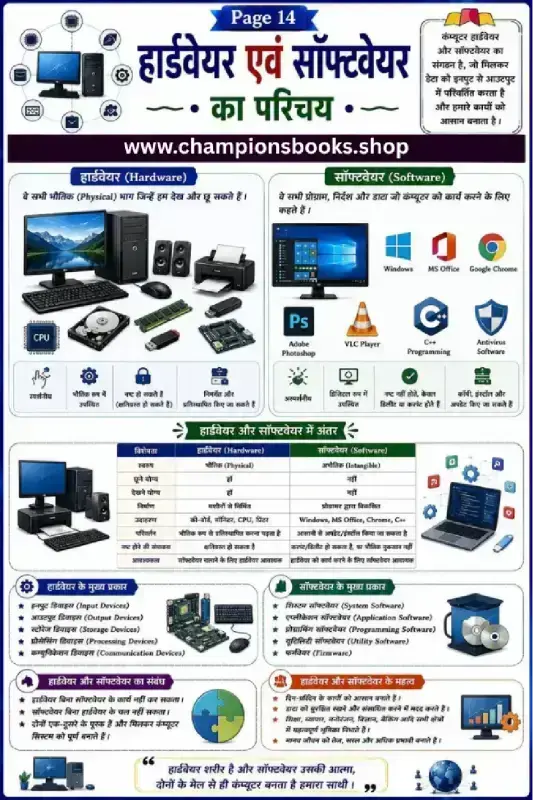
Computer Hardware and Software Worksheet in Hindi - Grade 3
About this Computer Hardware and Software Worksheet This educational worksheet is designed to introduce Grade 3 students to the fundamental concepts of computer systems. Written entirely in Hindi, this guide makes it easy for young learners to grasp the distinction between computer hardware and software. It features colorful illustrations and clear tables to make learning computer science engaging and interactive. What Students Will Learn Our comprehensive computer hardware and software worksheet in hindi covers the core essentials of primary school computer education: Introduction to Hardware (हार्डवेयर): Understand the physical components of a computer that you can see and touch, such as the CPU, monitor, keyboard, printer, and motherboard. Introduction to Software (सॉफ्टवेयर): Learn about the virtual programs and instructions that direct the computer, including operating systems like Windows, and applications like MS Office and Google Chrome. Key Differences: A clear, structured comparison table detailing the properties, tangibility, and functions of hardware versus software. Types of Components: Discover the main categories of hardware (input, output, storage, processing) and software (system, application, utility). Benefits of Using This Worksheet Bilingual Learning: Helps students connect Hindi terminology with standard English computer terms easily. Visual Representation: High-quality diagrams of real-world computer parts and popular software logos aid in quick recognition. Perfect for Classrooms and Home Study: Ideal for teachers looking for Grade 3 computer science resources or parents wanting to support their children's digital literacy.
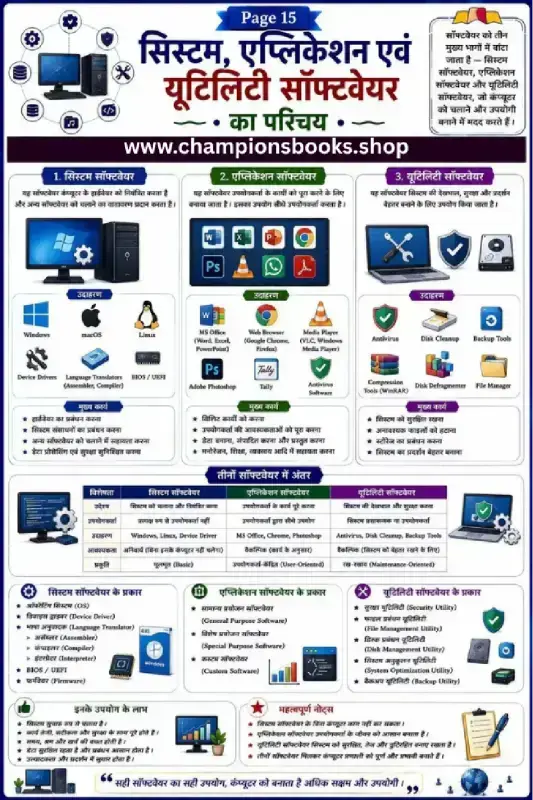
Types of Computer Software in Hindi Chart & Worksheet
कंप्यूटर सॉफ्टवेयर के प्रकार - सिस्टम, एप्लीकेशन और यूटिलिटी सॉफ्टवेयर यह शैक्षणिक चार्ट छात्रों को types of computer software in Hindi यानी कंप्यूटर सॉफ्टवेयर के विभिन्न प्रकारों को आसानी से समझने में मदद करता है। कंप्यूटर सॉफ्टवेयर को मुख्य रूप से तीन भागों में विभाजित किया गया है: सिस्टम सॉफ्टवेयर, एप्लीकेशन सॉफ्टवेयर, और यूटिलिटी सॉफ्टवेयर। यह वर्कशीट कक्षा 6 और उससे ऊपर के छात्रों के कंप्यूटर विज्ञान (ICT) पाठ्यक्रम के लिए अत्यंत उपयोगी है। इस वर्कशीट की मुख्य विशेषताएं (Key Features) सिस्टम सॉफ्टवेयर (System Software): यह कंप्यूटर के हार्डवेयर को नियंत्रित करता है। उदाहरण के लिए: Windows, macOS, Linux, Device Drivers और BIOS। एप्लीकेशन सॉफ्टवेयर (Application Software): यह उपयोगकर्ताओं के विशिष्ट कार्यों को पूरा करने के लिए बनाया गया है। उदाहरण के लिए: MS Office, Web Browsers, Photoshop और Tally। यूटिलिटी सॉफ्टवेयर (Utility Software): यह कंप्यूटर सिस्टम की सुरक्षा, रखरखाव और प्रदर्शन को बेहतर बनाने में मदद करता है। उदाहरण के लिए: Antivirus, Disk Cleanup, और Backup Tools। सीखने के लाभ (Learning Benefits) सॉफ्टवेयर में अंतर: छात्र एक स्पष्ट तालिका के माध्यम से सिस्टम, एप्लीकेशन और यूटिलिटी सॉफ्टवेयर के बीच मुख्य अंतर (उद्देश्य, आवश्यकता, प्रकृति) को आसानी से समझ सकते हैं। सॉफ्टवेयर के प्रकार: विभिन्न प्रकार के सॉफ्टवेयर जैसे ऑपरेटिंग सिस्टम, कस्टमाइज्ड सॉफ्टवेयर और सुरक्षा यूटिलिटीज का विस्तृत वर्गीकरण। महत्वपूर्ण बिंदु: कंप्यूटर के सुचारू संचालन में प्रत्येक सॉफ्टवेयर के महत्व और उपयोगिता की जानकारी दी गई है। यह हिंदी माध्यम के छात्रों के लिए कंप्यूटर सॉफ्टवेयर की बुनियादी समझ विकसित करने का एक बेहतरीन और सचित्र संसाधन है।
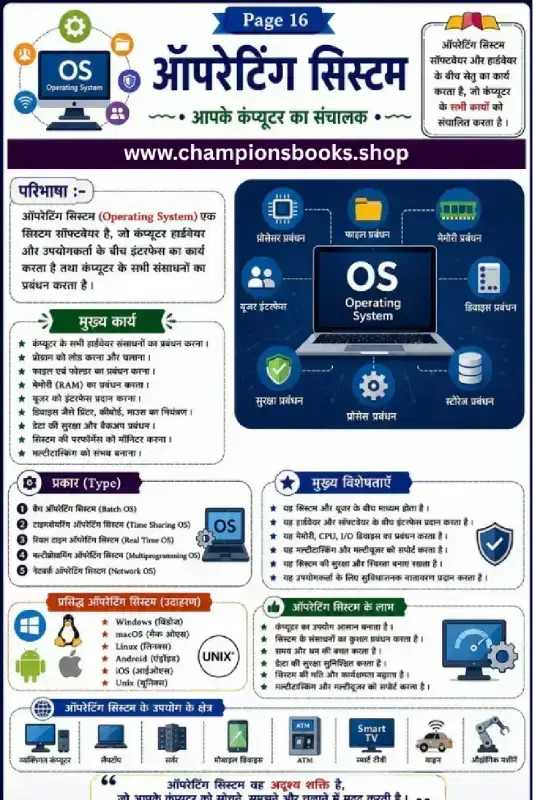
Operating System in Hindi Worksheet for Class 6 Computer
About this Worksheet The Operating System in Hindi Worksheet is an excellent educational resource designed for Grade 6 students to understand the core concept of computer operating systems (OS). Written in clear and easy-to-understand Hindi, this worksheet acts as a perfect guide for young learners to grasp how hardware and software communicate with each other. Whether you are a teacher looking for Hindi-medium computer resources or a parent helping your child study, this worksheet is tailored to simplify complex computer science topics into bite-sized visual lessons. What this Worksheet Covers Definition of OS: Explains how the operating system acts as an interface between computer hardware and the user. Main Functions: Covers crucial system tasks like memory management, process scheduling, file management, and device control. Types of Operating Systems: Introduces concepts like Batch OS, Time-Sharing OS, Real-Time OS, Multiprogramming OS, and Network OS. Popular Examples: Highlights widely used operating systems including Windows, macOS, Linux, Android, iOS, and Unix. Benefits & Applications: Showcases the advantages of an OS and its real-world applications in everyday devices like ATMs, Smart TVs, and smartphones. Learning Benefits for Students Conceptual Clarity: Helps students build a strong foundational knowledge of computer architecture in Hindi. Visual Learning: Highly engaging diagrams and flowcharts make complex technical terms easy to visualize and memorize. Exam Preparation: Summarized key points and clear definitions assist in quick last-minute revision before computer exams.
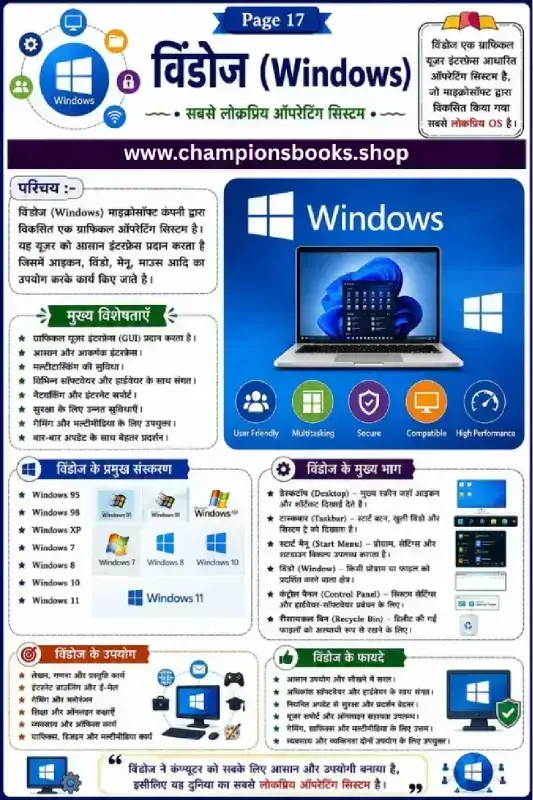
Windows Operating System Worksheet in Hindi for Grade 3
About this Worksheet Introduce young learners to the basics of computers with our comprehensive Windows Operating System Worksheet designed for Grade 3 students. Written in easy-to-understand Hindi, this educational resource helps children grasp the fundamental concepts of the world's most popular operating system. It serves as an excellent visual guide for school computer science labs and home study sessions. Key Learning Benefits Using this colorful and informative chart, students will develop essential digital literacy skills, including: Understanding OS Basics: Learn what an operating system is and why Microsoft Windows is so widely used. Visual Recognition: Identify the evolution of different Windows versions from Windows 95 to Windows 11. Component Familiarity: Understand key parts of the screen like the Desktop, Taskbar, Start Menu, and Recycle Bin. Practical Applications: Discover how Windows is used for education, gaming, business, and daily tasks. What's Covered in this Worksheet? This worksheet is divided into structured sections that make learning engaging and systematic: Introduction to Windows (परिचय): Explains the Graphical User Interface (GUI) and user-friendly features. Key Features (मुख्य विशेषताएँ): Highlights multitasking capabilities, high performance, and security features. Major Versions (विंडोज के प्रमुख संस्करण): A visual timeline of popular releases. Main Parts (विंडोज के मुख्य भाग): Clear explanations of core desktop elements like the Desktop, Taskbar, and Start Menu. Uses & Benefits (उपयोग और फायदे): Real-world applications of computer technology in everyday life.
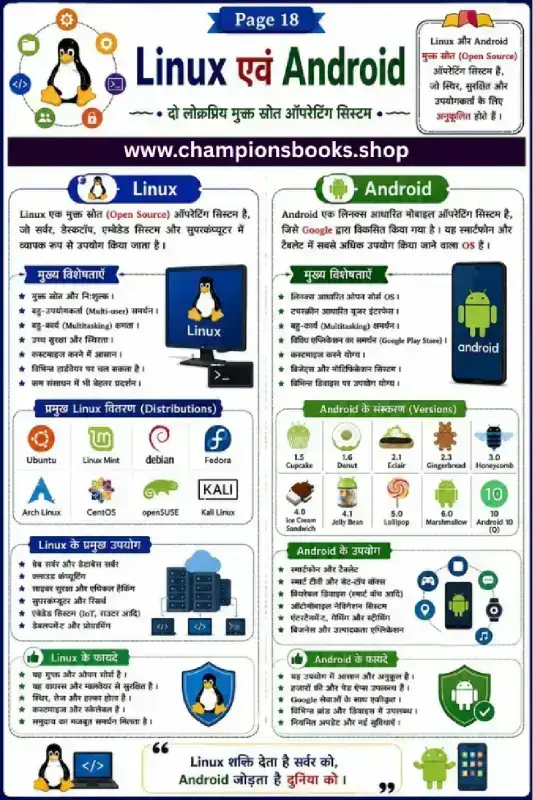
Linux and Android Operating System Worksheet in Hindi
About this Worksheet This educational worksheet, titled "Linux एवं Android", is a comprehensive study guide designed in Hindi for Grade 9 Computer Science students. It provides a clear and visually engaging comparison of two of the world's most popular open-source operating systems: Linux and Android. Perfect for classroom learning or self-study, this chart helps students grasp fundamental operating system concepts easily. Key Concepts Covered Introduction to Open Source: Understand the concept of open-source software and how free operating systems function. Linux Operating System: Explore the main features of Linux, its multi-user and multitasking capabilities, and its high security. Popular Linux Distributions: Learn about different versions of Linux, including Ubuntu, Debian, Fedora, Linux Mint, Kali Linux, and Arch Linux. Linux Applications: Discover how Linux powers web servers, cloud computing, cybersecurity, supercomputers, and IoT devices. Android Operating System: Study Android as a Linux-based mobile operating system developed by Google, along with its touchscreen interface. Android Versions: Follow the chronological evolution of Android versions from Cupcake and Gingerbread to Lollipop and Android 10. Android Uses and Benefits: Learn about its applications in smartphones, smart TVs, wearables, and navigation systems. Learning Benefits Visual Learning: Uses colorful icons and clear categorization to make complex computer science topics highly engaging. Bilingual Support: Presents key technical terms in both Hindi and English to build strong ICT vocabulary. Exam Preparation: Serves as an excellent quick-revision guide for Class 9 computer science exams and quizzes.
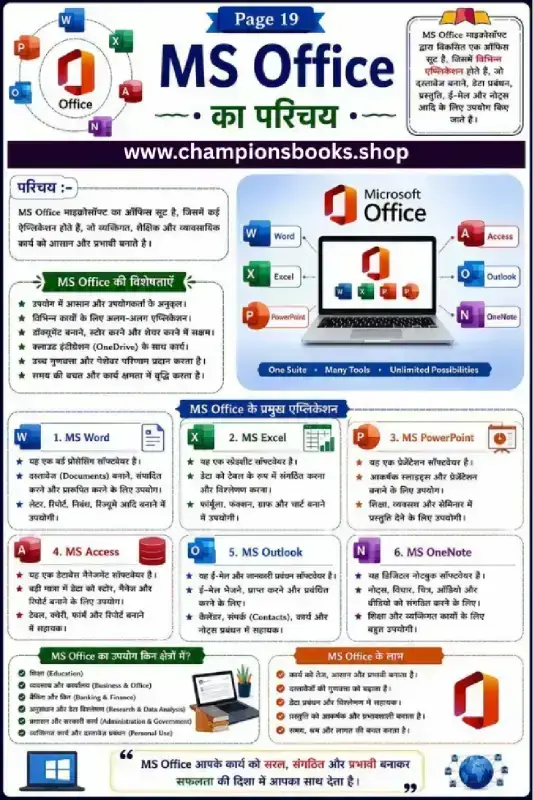
Learn MS Office: MS Office Introduction in Hindi Worksheet
About this MS Office Worksheet Introduce your students to the world of computer applications with our engaging MS Office Introduction in Hindi worksheet designed specifically for Grade 5 students. This visually appealing educational chart provides a clear and structured overview of Microsoft Office and its core programs in Hindi, making computer literacy accessible and fun. What Students Will Learn This comprehensive worksheet covers all the essential components of the MS Office suite, explaining their primary functions in simple Hindi. Students will explore: MS Word: Learn how to create, edit, and format text documents, letters, and reports. MS Excel: Discover how to organize data in tables, use formulas, and create charts. MS PowerPoint: Understand how to design attractive slides for educational and professional presentations. MS Access: Get an introduction to database management and organizing large amounts of data. MS Outlook: Learn about managing emails, calendars, and contacts efficiently. MS OneNote: Discover how to take digital notes, organize thoughts, and save ideas. Key Benefits of This Study Guide Using this worksheet in your classroom or at home offers several learning advantages: Bilingual Understanding: Helps Hindi-medium students grasp essential English technical terms easily. Visual Learning: Clear icons and organized sections keep young learners engaged and aid memory retention. Real-World Applications: Shows students how MS Office is used in education, business, banking, and daily life to save time and increase productivity.
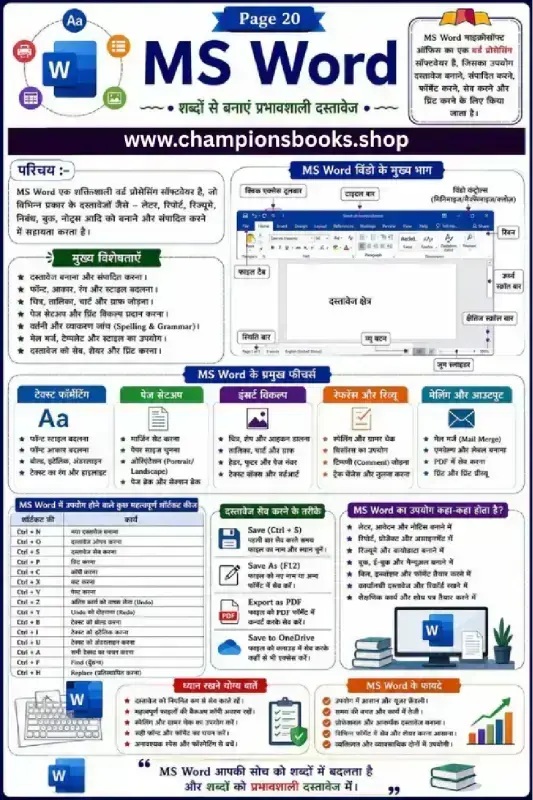
MS Word Basics Worksheet in Hindi | Computer Notes PDF
About this Worksheet Our MS Word Basics Worksheet in Hindi is a comprehensive visual guide designed to help students master the fundamentals of Microsoft Word. This educational resource breaks down complex word processing concepts into easy-to-understand Hindi text, making it perfect for young learners and beginners taking their first steps in computer science. This colorful infographic serves as an excellent reference sheet for students, teachers, and parents alike. By providing bilingual terminologies, it ensures that students understand both the English software commands and their Hindi explanations, bridging the learning gap effectively. Key Features Covered Interface Anatomy: Learn the main parts of the MS Word window, including the Ribbon, Title Bar, Document Area, and Status Bar. Core Functions: Explore essential features such as Text Formatting, Page Setup, Insert options, and Mail Merge. Shortcut Keys Cheat Sheet: Master crucial keyboard shortcuts like Ctrl+C (Copy), Ctrl+V (Paste), and Ctrl+S (Save) to work faster. Saving Methods: Understand different ways to preserve your work, including Save As, Export to PDF, and Cloud Saving via OneDrive. Practical Benefits: Discover how MS Word saves time, boosts productivity, and helps create professional-looking documents. Learning Benefits Builds a strong foundation in digital literacy and essential office software. Encourages independent learning with clear, bilingual visual aids and step-by-step pointers. Perfect study guide for school exams, practical lab sessions, and homework assignments.
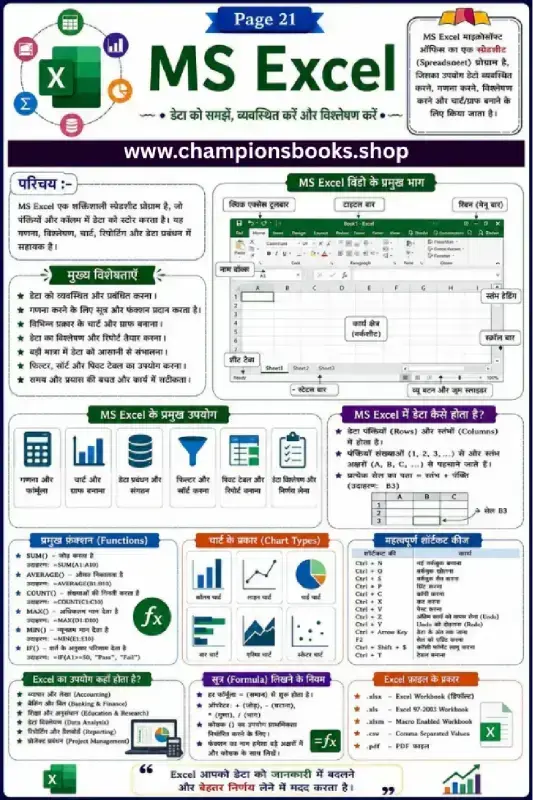
MS Excel Basics in Hindi Worksheet and Quick Guide
Master Spreadsheet Essentials with MS Excel Basics in Hindi Introduce students to the powerful world of data management with our comprehensive MS Excel Basics in Hindi worksheet. Designed specifically for middle school students, this visual study guide simplifies complex spreadsheet concepts into easy-to-understand Hindi explanations. Whether they are learning about rows and columns or discovering how formulas work, this resource is the perfect addition to any computer science curriculum. Key Topics Covered in this Guide Introduction to MS Excel: Understand what a spreadsheet is and how it helps in organizing, calculating, and analyzing data. Excel Window Components: Learn about key interface elements like the Quick Access Toolbar, Ribbon, Name Box, Worksheet area, and Status Bar. Essential Formulas & Functions: Step-by-step guidance on basic functions like SUM(), AVERAGE(), COUNT(), MAX(), MIN(), and IF(). Important Shortcut Keys: Boost productivity with quick shortcuts such as Ctrl+N (New), Ctrl+S (Save), Ctrl+C (Copy), and Ctrl+V (Paste). Chart Types & File Formats: Explore visual data representations like Column, Pie, and Line charts, alongside common file extensions like .xlsx and .csv. Learning Benefits for Students By studying this MS Excel Basics in Hindi infographic, students will develop practical computer literacy skills. This worksheet helps learners visualize the structure of cells, rows, and columns while mastering the rules for writing active formulas. It serves as an excellent quick-reference sheet for exams, practical lab sessions, and classroom activities.
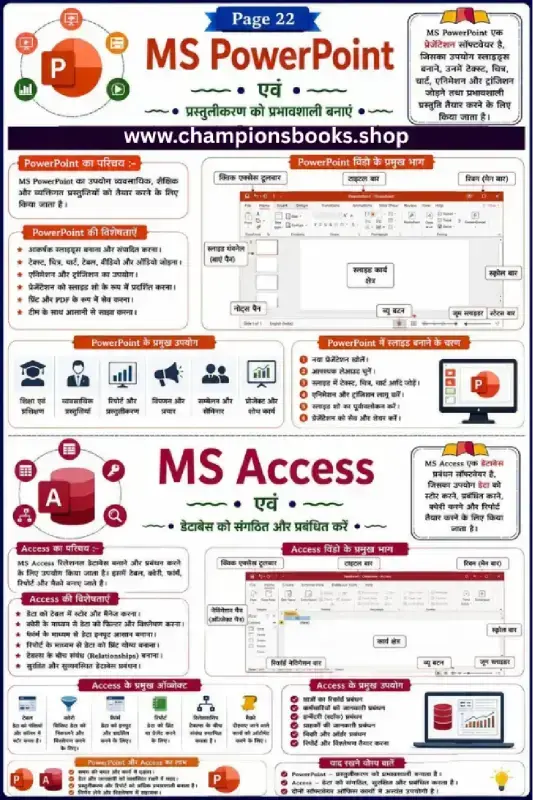
MS PowerPoint and MS Access Worksheet in Hindi | Grade 5
About this MS PowerPoint and MS Access Worksheet This comprehensive educational worksheet is designed specifically for Grade 5 students to master the fundamentals of Microsoft PowerPoint and Microsoft Access in Hindi. This visual study guide simplifies essential computer science concepts, helping young learners understand the core differences and applications of presentation and database management tools. It is an ideal resource for both classroom instruction and home revision. Key Learning Topics Covered The worksheet is divided into two major sections, providing structured notes and interface guides for both software systems: MS PowerPoint Basics: Understand how to create dynamic presentations, insert media (images, audio, video), and apply transition effects to slides. PowerPoint Interface: Learn to identify major window components such as the Title Bar, Quick Access Toolbar, Ribbon, Slide Pane, and Notes Pane. MS Access Fundamentals: Introduction to databases, learning how to organize, store, and manage structured data efficiently. Database Objects: Explore key Access components including Tables, Queries, Forms, and Reports with clear Hindi explanations. Practical Applications: Real-world use cases for both software, such as school projects, business reporting, and data management. Why Use This Hindi Computer Worksheet? Teaching computer concepts in regional languages boosts comprehension and retention. This worksheet offers several key benefits: Visual Reinforcement: Clear screenshots and labeled diagrams help students easily locate tools during practical lab sessions. Exam Preparation: Summarized points and quick-remember facts (Yaad Rakhne Yogya Baatein) make it an excellent revision sheet. Digital Literacy: Builds critical IT skills early, preparing students for more advanced technology topics in middle school.
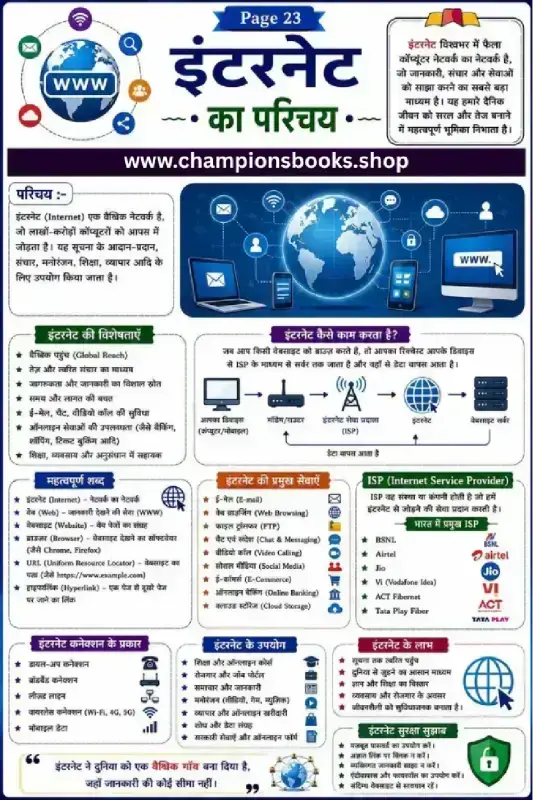
Introduction to Internet in Hindi Worksheet for Grade 5
About this Worksheet This educational worksheet, titled "इंटरनेट का परिचय" (Introduction to Internet), is an excellent learning resource designed for Grade 5 students. Written in clear Hindi with helpful English technical terms, this chart serves as a complete study guide for young learners beginning their journey into computer networks and digital literacy. Key Learning Topics Covered What is the Internet? (परिचय): A simple definition explaining the global network connecting millions of computers to share information. How the Internet Works: A visual flow diagram showing data transfer from devices through Modems, Routers, and Internet Service Providers (ISPs) to web servers. Important Terminology: Clear explanations of essential terms like Web, Website, Browser, URL, and Hyperlink. Types of Connections & Services: Learn about Broadband, Wi-Fi, 4G/5G, and essential services like E-mail, E-Commerce, and Cloud Storage. Internet Safety (सुरक्षा सुझाव): Crucial safety tips for kids, including using strong passwords and avoiding suspicious links. Learning Benefits This worksheet is perfect for classroom instruction, revision, or home study. It helps students build a strong foundational understanding of modern technology, network infrastructure, and cybersecurity best practices. The bilingual approach ensures students learn standard technical vocabulary alongside their Hindi translation.
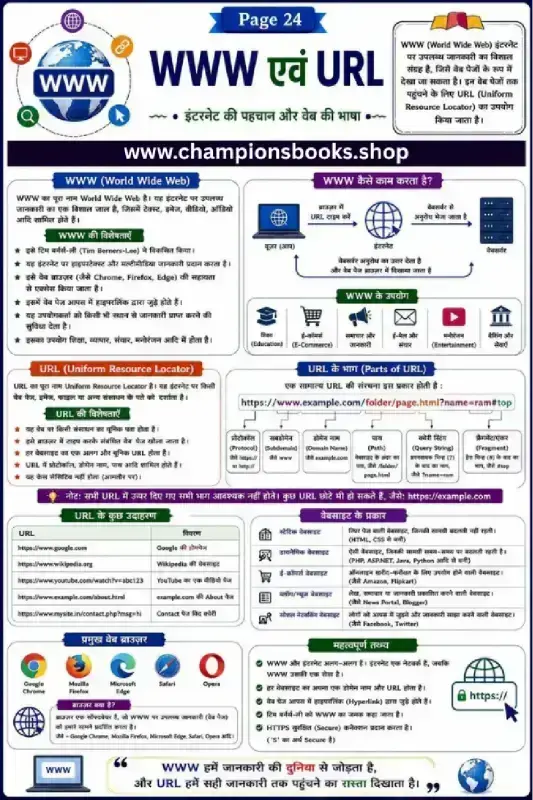
Learn WWW and URL: Grade 6 Computer Worksheet in Hindi
About this Worksheet This comprehensive computer science infographic and worksheet is designed for Grade 6 students to master the fundamental concepts of the internet in Hindi. It provides a clear, visual explanation of WWW (World Wide Web) and URL (Uniform Resource Locator), helping students understand how the web functions and how web addresses are structured. Key Learning Benefits Understand WWW Basics: Learn the definition of the World Wide Web, its core features, its history, and how it differs from the physical internet. Anatomy of a URL: Explore the complete breakdown of a URL, including components like Protocol, Subdomain, Domain Name, Path, Query String, and Fragment. Web Browsers and Websites: Learn about popular web browsers such as Google Chrome, Mozilla Firefox, and Safari, alongside different types of websites like static, dynamic, and e-commerce platforms. Bilingual Learning: Key technical terms are presented in both English and Hindi, making it easier for students to grasp global computer terminology. How to Use This Resource This worksheet is an excellent study guide for classroom lessons, computer lab activities, or home revision. Teachers can use this visual layout to explain web protocols, followed by quick quizzes where students identify different parts of a given URL. It serves as a strong foundation for digital literacy and introductory web technology education.