
All Worksheets
Browse our complete collection of free printable worksheets
Filter Worksheets
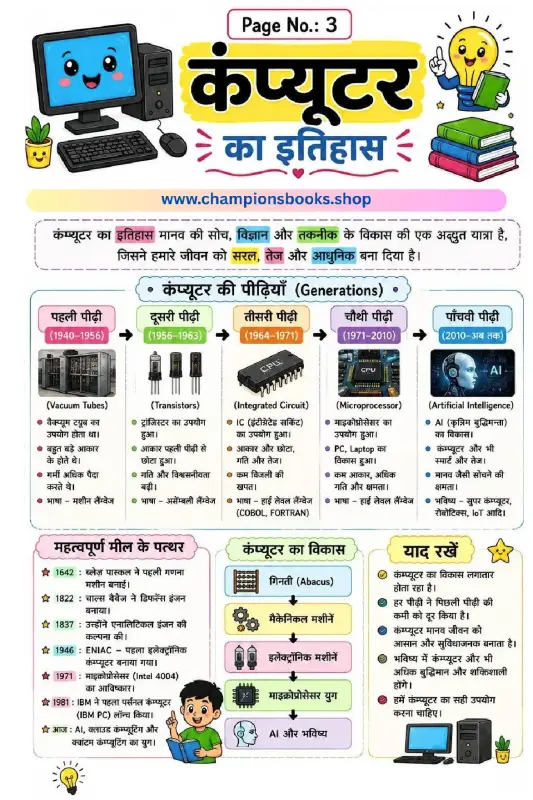
History of Computer in Hindi - Generations & Milestones
About this Worksheet: History of Computer in Hindi Explore the fascinating journey of technology with our colorful and engaging History of Computer in Hindi educational worksheet. Specially designed for elementary school students, this comprehensive visual guide simplifies complex technological milestones into easy-to-understand sections. It serves as an excellent resource for teachers, parents, and young learners to grasp how computers evolved from simple counting tools to highly intelligent machines. Key Topics Covered Generations of Computers (कंप्यूटर की पीढ़ियाँ): A complete timeline from the First Generation (Vacuum Tubes, 1940-1956) to the Fifth Generation (Artificial Intelligence, 2010-Present). Historical Milestones (महत्वपूर्ण मील के पत्थर): Key historical events starting from Blaise Pascal's calculator in 1642, Charles Babbage's analytical engine, ENIAC, up to modern AI and cloud computing. Evolution of Computing (कंप्यूटर का विकास): A step-by-step flowchart tracking development from the Abacus and mechanical machines to microprocessors and AI. Important Takeaways (याद रखें): Quick-reference facts highlighting how computers continuously evolve to make human life easier and more efficient. Learning Benefits Enhances technological literacy by introducing foundational computer history concepts. Supports Hindi vocabulary development with specialized scientific and technical terms. Improves visual learning through clear diagrams, timelines, and engaging illustrations. Encourages critical thinking about how technology shapes our daily lives and future.
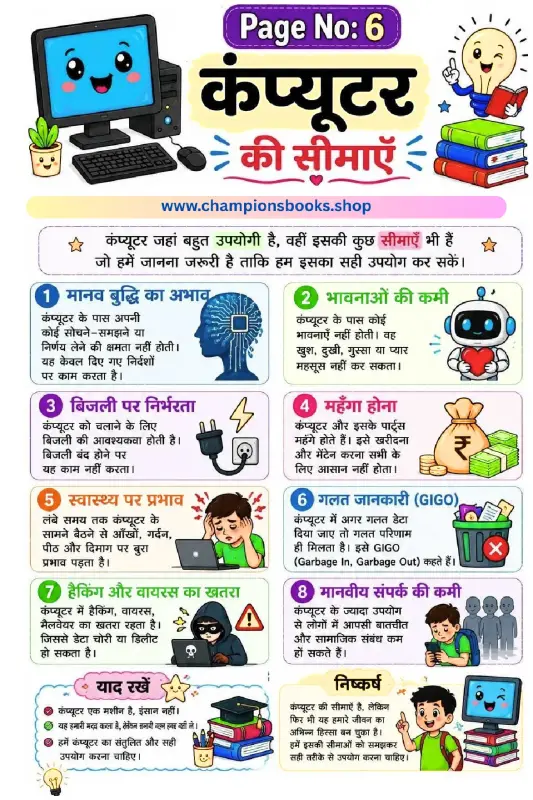
Limitations of Computer in Hindi - Grade 3 Worksheet
About this Worksheet: Computer ki Seemaye This colorful and engaging educational worksheet is designed for Grade 3 students to help them understand the limitations of computer in Hindi (कंप्यूटर की सीमाएँ). While computers are incredibly useful and powerful machines, they also have certain limitations and disadvantages that children should learn to ensure responsible usage. Key Learning Points Covered The worksheet beautifully illustrates 8 major limitations of computers with easy-to-understand Hindi text and graphics: मानव बुद्धि का अभाव (Lack of Intelligence): Computers cannot think, understand, or make decisions on their own; they only follow instructions. भावनाओं की कमी (No Emotions): Computers do not feel happiness, sadness, anger, or love. बिजली पर निर्भरता (Dependency on Electricity): A computer cannot function without electricity or battery power. महँगा होना (High Cost): Buying and maintaining computers and their parts can be expensive. स्वास्थ्य पर प्रभाव (Health Impacts): Sitting in front of a computer for long hours can negatively affect the eyes, neck, back, and mind. गलत जानकारी (GIGO - Garbage In, Garbage Out): If incorrect data is entered, the computer will produce incorrect results. हैकिंग और वायरस का खतरा (Hacking and Virus Threat): There is always a risk of data theft, malware, and cyber threats. मानवीय संपर्क की कमी (Reduced Social Interaction): Excessive computer use can lead to less face-to-face communication and weaker social bonds. Learning Benefits for Kids Promotes a balanced perspective on technology and digital wellness. Introduces essential computer science terminology in Hindi. Encourages critical thinking about how and when to use digital devices safely.
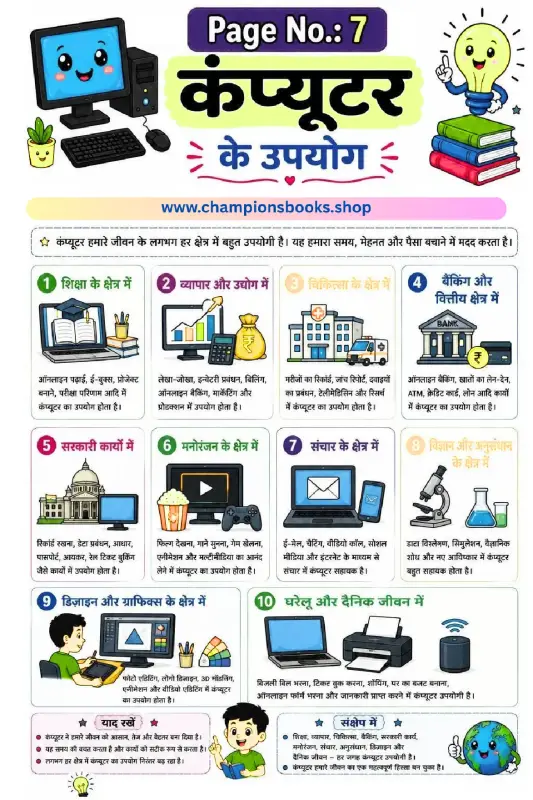
Uses of Computer in Hindi Worksheet for Kids | Grade 3
About this Worksheet: Uses of Computer in Hindi This colorful and engaging educational worksheet is designed to teach Grade 3 students about the various uses of computer (कंप्यूटर के उपयोग) in our daily lives and different professional fields. It features 10 distinct areas where computers play a vital role, accompanied by clear illustrations and simple Hindi text to make learning both fun and easy. Key Learning Areas Covered शिक्षा के क्षेत्र में (Education): Online learning, e-books, and school projects. व्यापार और उद्योग (Business & Industry): Billing, accounting, and inventory management. चिकित्सा के क्षेत्र में (Medicine): Managing patient records and medical research. बैंकिंग और वित्तीय क्षेत्र (Banking & Finance): Online banking and ATM transactions. सरकारी कार्यों में (Government Work): Record keeping, passports, and railway bookings. मनोरंजन के क्षेत्र में (Entertainment): Movies, music, and video games. संचार के क्षेत्र में (Communication): Emails, video calls, and social media. विज्ञान और अनुसंधान (Science & Research): Data analysis and scientific discoveries. डिजाइन और ग्राफिक्स (Design & Graphics): Photo editing, 3D modeling, and video editing. घरेलू और दैनिक जीवन में (Daily Life): Bill payments, online shopping, and home budgeting. Benefits for Grade 3 Students Enhances vocabulary in both Hindi and basic computer terminology. Develops a strong foundational understanding of modern technology and its applications. Visual aids and colorful illustrations help in better retention and engagement for young learners.
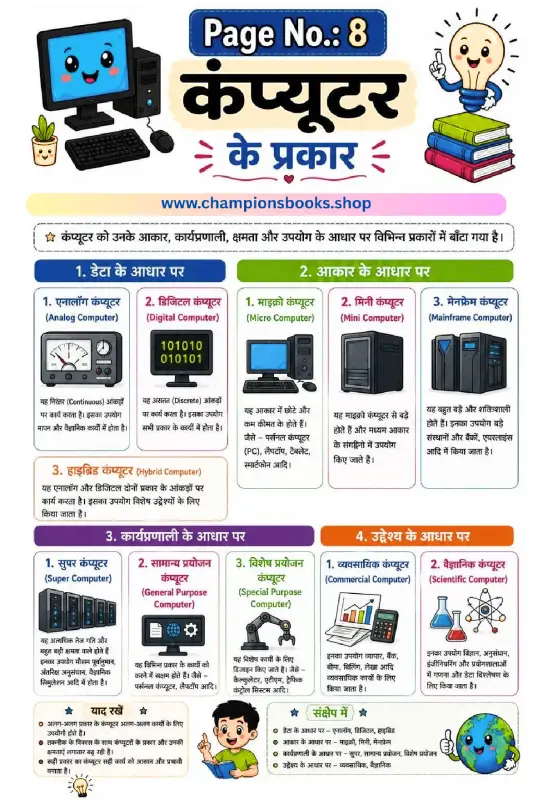
Types of Computer in Hindi Worksheet | Computer ke Prakar
About this Worksheet: Types of Computer in Hindi This educational worksheet, titled "कंप्यूटर के प्रकार" (Types of Computer in Hindi), is designed specifically for primary school students to help them understand how computers are classified. It serves as an excellent visual guide for young learners to grasp fundamental computer science concepts in a simple, bilingual format (Hindi and English). Key Classifications Covered The worksheet breaks down the classification of computers into four main categories based on different criteria: Based on Data (डेटा के आधार पर): Introduces students to Analog Computers, Digital Computers, and Hybrid Computers with clear visual examples. Based on Size (आकार के आधार पर): Explains the differences between Micro Computers (like PCs and smartphones), Mini Computers, and large Mainframe Computers. Based on Working Principle (कार्यप्रणाली के आधार पर): Covers high-performance Super Computers, as well as General Purpose and Special Purpose Computers. Based on Purpose (उद्देश्य के आधार पर): Differentiates between Commercial Computers used in business and Scientific Computers used in research. Learning Benefits for Students By using this colorful and engaging worksheet, students will achieve several learning milestones: Understand basic computer terminology in both Hindi and English. Learn to identify different types of computer systems based on their real-world applications. Enhance critical thinking by comparing capabilities, sizes, and purposes of various computing devices. Build a strong foundational knowledge of computer science from an early grade level. This resource is perfect for teachers, homeschooling parents, and students looking to reinforce their computer literacy skills in an intuitive, visual manner.
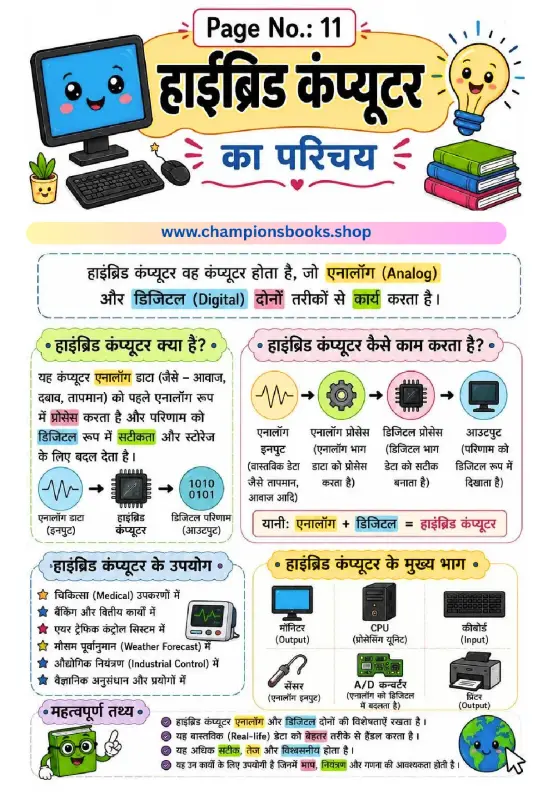
Hybrid Computer in Hindi: Definition, Parts & Uses
About this Worksheet: Introduction to Hybrid Computer This educational worksheet is designed to introduce young learners to the concept of a hybrid computer in Hindi (“हाईब्रिड कंप्यूटर का परिचय”). Ideal for primary school students, this colorful visual guide explains how hybrid systems blend the features of both analog and digital computers to perform complex tasks efficiently. What is a Hybrid Computer? A hybrid computer (हाईब्रिड कंप्यूटर) is a unique system that processes both analog data (like temperature, pressure, and sound) and digital data (numbers and codes). It takes analog inputs, processes them, and converts the results into digital output for high accuracy and easy storage. Key Features & Learning Benefits Dual Functionality: Understand how analog and digital components work together (Analog + Digital = Hybrid). Step-by-Step Working: Learn the data flow from analog input, processing, to digital output clearly. Real-World Applications: Discover where hybrid computers are used, such as in medical equipment, weather forecasting, and air traffic control. Main Components: Identify key parts like the CPU, monitor, sensor, keyboard, printer, and A/D converter (Analog to Digital Converter). Why Use This Worksheet? This worksheet makes computer science concepts highly accessible for Hindi-medium students. With clear illustrations, color-coded sections, and simple Hindi explanations, children can easily grasp complex technical terms, making it a perfect resource for classroom teaching or home study.
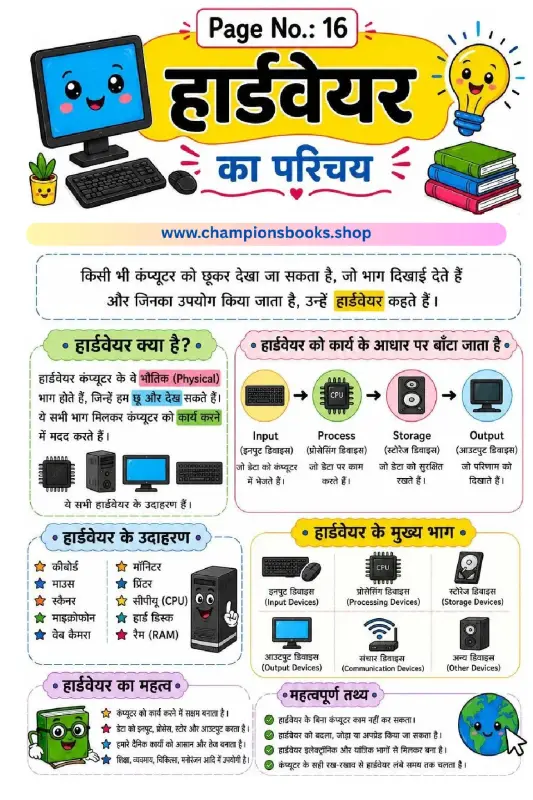
Learn Computer Hardware in Hindi - Class 3 Worksheet
About this Computer Hardware in Hindi Worksheet This educational worksheet is specifically designed to introduce young learners to the fundamental concepts of computer hardware in Hindi. Perfect for Class 3 students, this colorful and engaging page helps children understand the physical components of a computer that they can see and touch. What Students Will Learn This comprehensive worksheet covers all the essential aspects of computer hardware, making it easy for kids to grasp basic computer science concepts. Key topics include: Definition of Hardware: Simple explanations of physical computer parts (भौतिक भाग) that can be touched and seen. Functional Classification: Understanding how hardware is divided into Input, Process, Storage, and Output devices. Real-world Examples: Clear illustrations of common hardware components like keyboards, mice, monitors, printers, CPUs, and scanners. Importance of Hardware: Learning why hardware is vital for computer operations and how it makes daily tasks faster and easier. Fun Facts: Interesting trivia about upgrading hardware and proper maintenance tips. Learning Benefits for Grade 3 Students Using visual worksheets is an excellent way to enhance cognitive learning in children. By studying this computer hardware guide, students will build a strong foundation in digital literacy. The bilingual terminology (Hindi and English) ensures that learners can easily bridge the gap between both languages while identifying computer parts in real life. This resource is ideal for classroom teaching, homeschooling, or quick revision before exams.
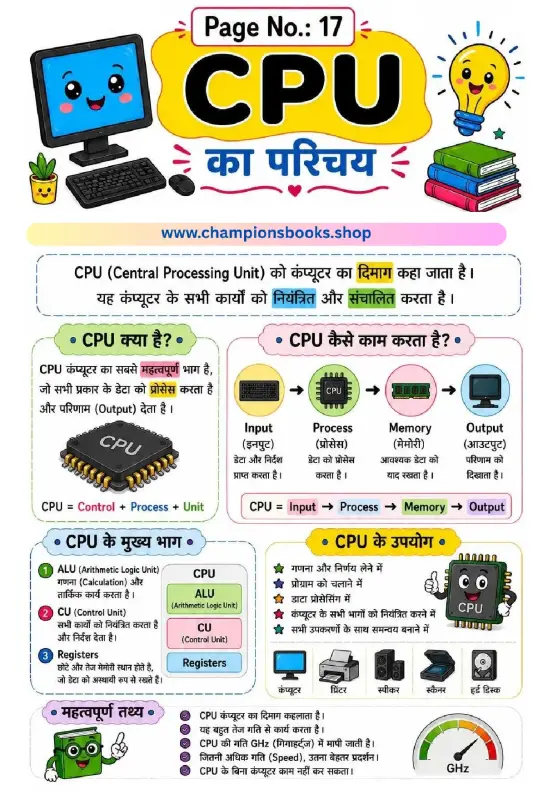
CPU Introduction in Hindi Worksheet for Kids | Grade 3
Introduce Kids to the Brain of the Computer (CPU) Help young learners master the basics of computer science with our colorful and engaging CPU Introduction in Hindi worksheet. Designed specifically for primary school students, this educational resource explains the core concepts of a Central Processing Unit (CPU) in simple, easy-to-understand Hindi language. Key Learning Concepts Covered This worksheet serves as an excellent visual guide to help children grasp how computers process information. It covers several fundamental topics: What is a CPU? (CPU क्या है?): Explains why the CPU is known as the brain of the computer and how it processes data to deliver output. How CPU Works: A step-by-step visual workflow showing the relationship between Input, Process, Memory, and Output. Main Parts of CPU: Clear definitions of ALU (Arithmetic Logic Unit), CU (Control Unit), and Registers. Uses and Functions: Highlights how the CPU controls all connected devices like printers, speakers, and scanners. Fun Facts: Explains CPU speed measurement in GHz (Gigahertz) in a kid-friendly manner. Benefits for Students and Teachers Whether you are a parent homeschooling your child or a school teacher planning a computer applications class, this worksheet is a perfect teaching aid. The vibrant illustrations and clear Hindi text keep kids engaged while building a strong foundation in digital literacy and technology basics. How to Use This Worksheet Download and print this high-quality worksheet for classroom activities, homework assignments, or quick revision sessions. Encourage students to read the Hindi text aloud and label their own computer diagrams to reinforce their learning. It's an ideal resource for bilingual learners taking their first steps into the world of technology!
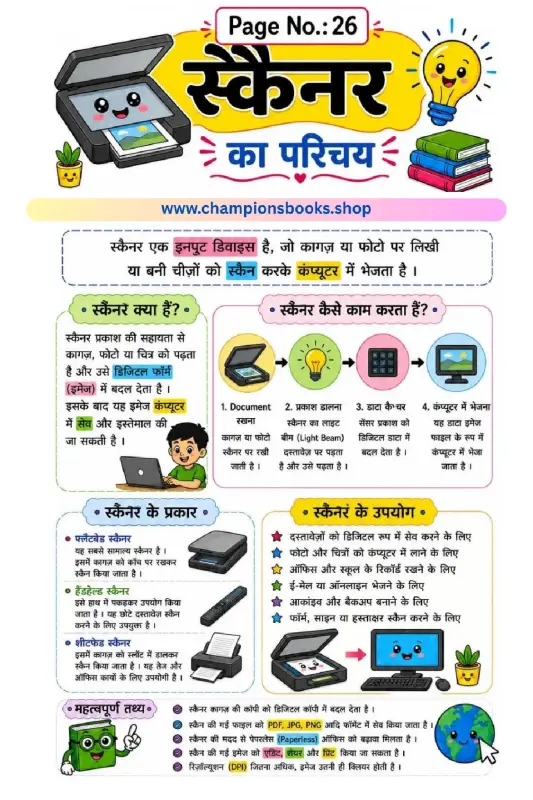
Computer Scanner Worksheet in Hindi - Learn Scanner Basics
About this Worksheet Introduce young learners to essential computer hardware with our interactive Computer Scanner Worksheet in Hindi. Designed specifically for elementary school students (Grade 3 to 5), this colourful worksheet provides a comprehensive introduction to scanners, explaining how they function as crucial input devices. With clear Hindi explanations and engaging visual aids, children will easily grasp how physical documents, photos, and drawings are converted into digital formats to be saved on a computer. What this Worksheet Covers This educational resource breaks down complex technical concepts into simple, easy-to-digest sections for young minds: Introduction to Scanners: Understands what a scanner is and how it acts as an input device. Working Process: A step-by-step visual guide showcasing how scanners place, light, capture, and send data. Types of Scanners: Introduces common types including Flatbed Scanners, Handheld Scanners, and Sheetfed Scanners. Uses of Scanners: Explores practical applications such as digital archiving, saving photos, emailing documents, and office record keeping. Important Facts: Key takeaways about DPI (Dots Per Inch), file formats like PDF, JPG, and PNG, and promoting a paperless office environment. Learning Benefits Enhances computer literacy and technical vocabulary in Hindi. Visual diagrams make complex technical processes easy to understand for Grade 3 kids. Encourages critical thinking about how daily technology works around us. Perfect resource for teachers and homeschooling parents looking for high-quality Hindi computer science worksheets.
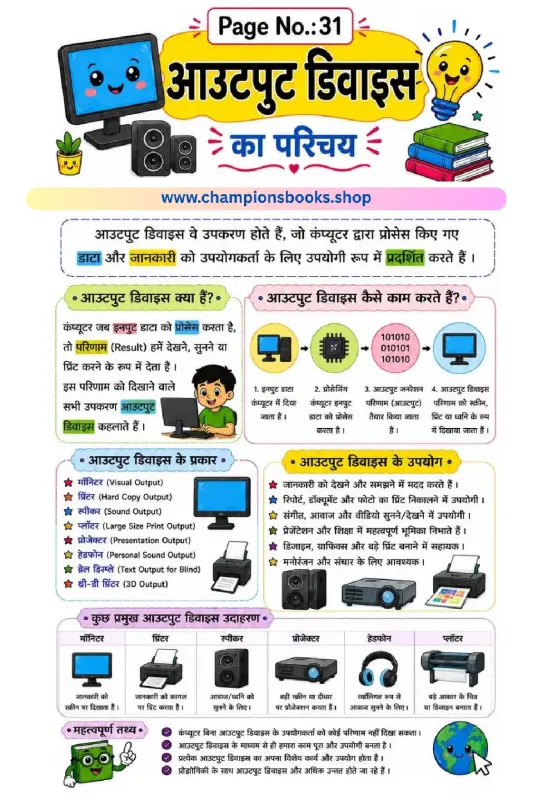
Computer Output Devices Worksheet in Hindi | Grade 3
About this Worksheet Introduce young learners to the basics of computer hardware with our engaging computer output devices worksheet in hindi. Specifically tailored for Grade 3 students, this colorful educational resource simplifies complex computer concepts into easy-to-understand Hindi. It serves as an excellent teaching aid for both classroom instruction and home study, helping children build a strong foundation in computer literacy. Key Concepts Covered This comprehensive worksheet covers all the essential aspects of computer output systems: What are Output Devices?: Clear definitions explaining how devices display, print, or play the results of processed data. How They Function: A simple 4-step diagram showing the transition from input data, processing, output generation, to final display. Common Examples: Visual guides for key devices such as monitors, printers, speakers, projectors, headphones, and plotters. Real-World Uses: Practical examples of how we use these devices daily for entertainment, communication, and learning. Learning Benefits for Grade 3 Students Using this worksheet offers several educational advantages: Visual Reinforcement: High-quality illustrations help students associate terms with real-world objects. Bilingual Learning: Helps children learn technical computer terms in both Hindi and English. Critical Thinking: Encourages students to identify and categorize different hardware components based on their functions.
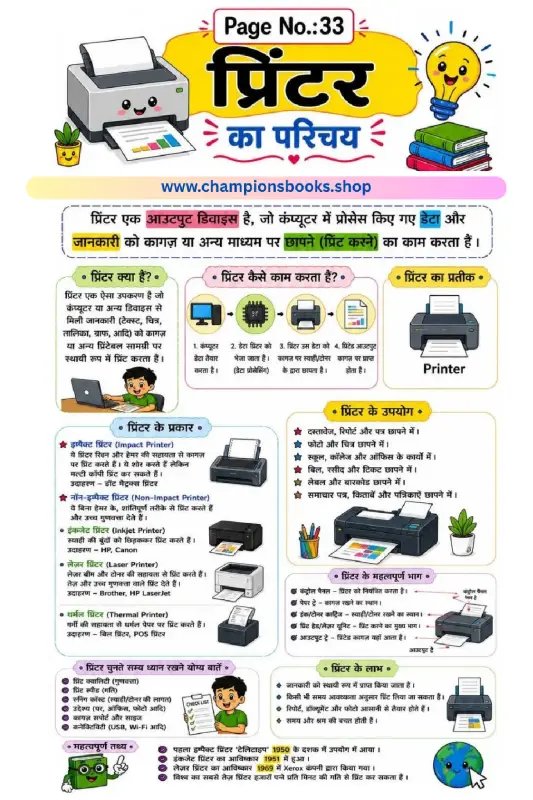
Introduction to Printer Worksheet in Hindi | Computer Basics
About this Worksheet This educational worksheet is designed to help young learners understand the basics of a computer printer in Hindi (प्रिंटर का परिचय). It covers essential concepts suitable for primary school students (Grades 3 to 5) learning computer science basics in Hindi medium. With colorful illustrations and clear diagrams, this sheet simplifies complex hardware concepts for children. Key Learning Topics Covered प्रिंटर क्या है? (What is a Printer?): Understanding the printer as an essential output device that prints digital data onto paper. प्रिंटर कैसे काम करता है? (How Printers Work): A step-by-step visual process showing how data travels from a computer to the printed page. प्रिंटर के प्रकार (Types of Printers): Introduction to Impact (Dot Matrix) and Non-Impact (Inkjet, Laser, Thermal) printers. प्रिंटर के उपयोग (Uses of Printers): Practical applications of printing documents, photos, school assignments, and receipts. प्रिंटर के महत्वपूर्ण भाग (Parts of a Printer): Identifying key components like the control panel, paper tray, and ink/toner cartridges. Learning Benefits Enhances computer literacy and hardware vocabulary in Hindi. Visual diagrams make it easy for children to grasp technical concepts quickly. Includes interesting historical facts to boost curiosity about the evolution of technology. Perfect resource for teachers and parents looking for high-quality, engaging Hindi medium ICT worksheets.
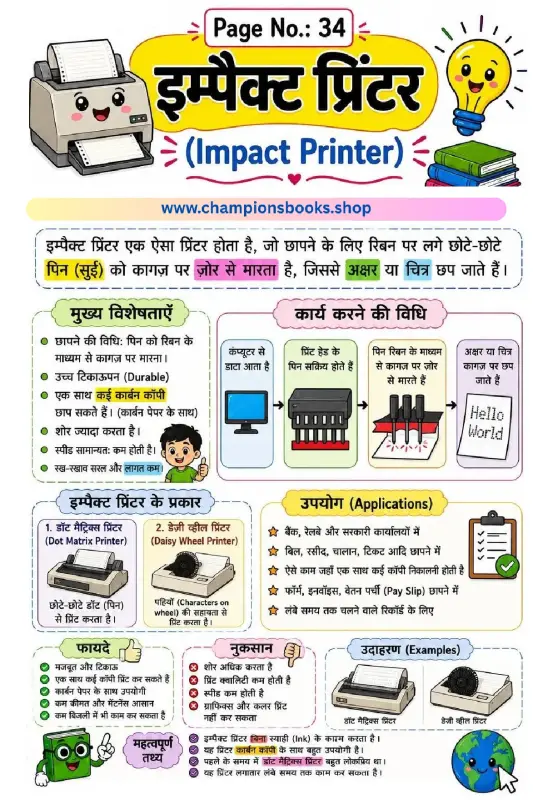
Impact Printer in Hindi Worksheet for Kids | Grade 3 Computer
इम्पैक्ट प्रिंटर (Impact Printer) Worksheet for Kids Introduce your primary school students to the fundamental concepts of computer hardware with this engaging and colorful Impact Printer in Hindi Worksheet. Specially designed for Grade 3 and elementary students, this educational resource simplifies complex computer concepts into easy-to-understand Hindi text accompanied by vibrant illustrations. What is an Impact Printer? (इम्पैक्ट प्रिंटर क्या है?) An impact printer is a type of printer that operates by direct contact of an ink ribbon with paper. This worksheet beautifully explains the mechanism: "इम्पैक्ट प्रिंटर एक ऐसा प्रिंटर होता है, जो छापने के लिए रिबन पर लगे छोटे-छोटे पिन (सुई) को कागज़ पर ज़ोर से मारता है, जिससे अक्षर या चित्र छप जाते हैं।" Key Features & Learning Benefits This comprehensive worksheet covers everything a young learner needs to know about impact printers, including: Working Mechanism (कार्य करने की विधि): Step-by-step visual diagram showing how data travels from the computer to activate the print head pins to strike the paper. Types of Impact Printers: Introduces children to Dot Matrix Printers (डॉट मैट्रिक्स प्रिंटर) and Daisy Wheel Printers (डेज़ी व्हील प्रिंटर) with clear diagrams. Pros & Cons (फायदे और नुकसान): Explains the advantages like durability and carbon copy capability, alongside limitations like noise, slower speed, and lack of color printing. Real-world Applications (उपयोग): Helps children learn where these printers are used today, such as banks, railways, billing systems, and government offices. Why Choose This Worksheet? Learning computer science in one's native language helps build stronger foundational concepts. This worksheet is perfect for classroom activities, homework assignments, or homeschooling. It encourages critical thinking by comparing different printer types and understanding their practical uses in everyday life.
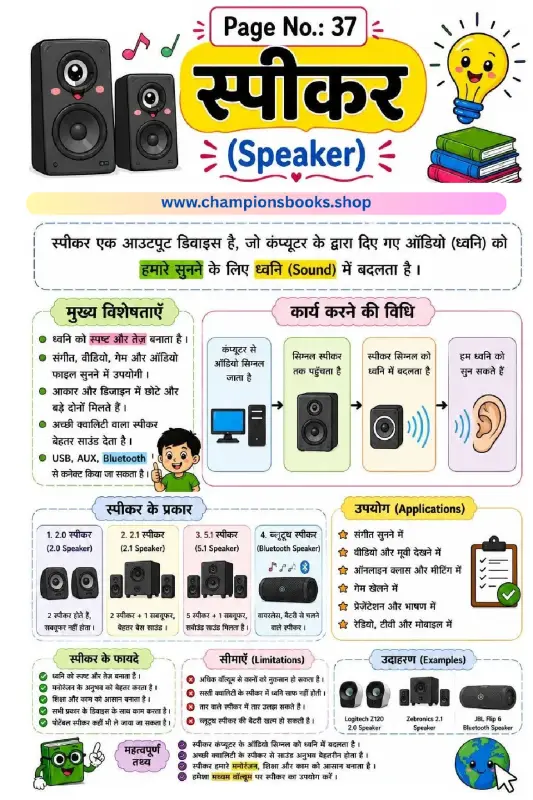
Speaker Computer Output Device Worksheet | Grade 3 Computer
About this Worksheet Introduce young learners to the world of computer hardware with our interactive Speaker Computer Output Device Worksheet. Tailored for Grade 3 students, this colorful study guide explains the concept of speakers in both Hindi and English. It helps children understand how a speaker converts digital audio signals from a computer into sound that we can easily hear. Key Topics Covered Definition of Speaker: Learn why a speaker is classified as an essential output device. How it Works (कार्य करने की विधि): Step-by-step visual representation of how audio signals travel from the computer to our ears. Types of Speakers: Understand different configurations including 2.0, 2.1, 5.1, and Bluetooth speakers. Applications & Uses: Real-world uses of speakers in online classes, gaming, music, and presentations. Pros & Cons: Explores the advantages (clear sound, portability) and limitations (hearing safety with high volume). Learning Benefits This worksheet is an excellent resource for parents and teachers to simplify computer science concepts. By studying this sheet, students will: Easily identify different types of sound output devices. Enhance their bilingual vocabulary (Hindi and English) for computer parts. Develop a foundational understanding of how computer peripherals function together. How to Use This Worksheet This worksheet serves as a perfect visual aid for classroom teaching or home revision. Teachers can use it to initiate a classroom discussion about input versus output devices. Parents can print this guide to help children review important facts about volume safety and audio technology. With clear diagrams and child-friendly language, mastering computer basics has never been more fun!
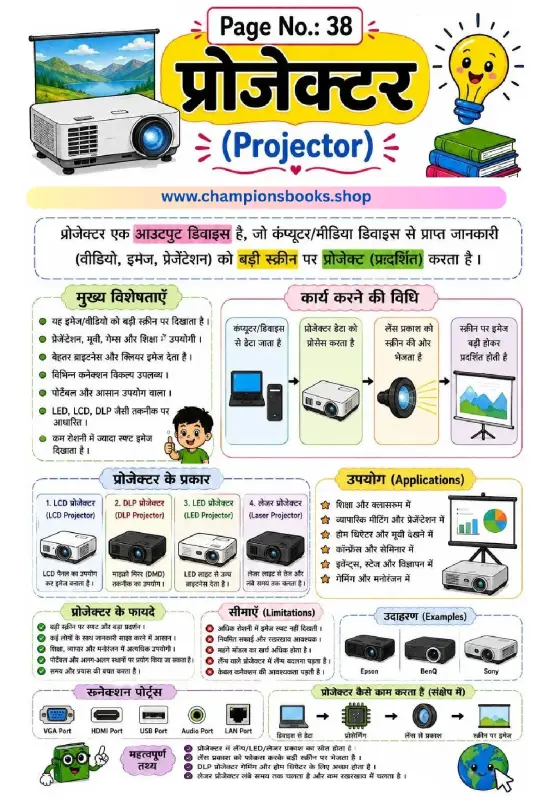
Projector Output Device Worksheet for Kids | Computer Basics
About this Projector Output Device Worksheet Introduce young learners to the world of computer hardware with our comprehensive projector output device worksheet. This beautifully designed bilingual (Hindi and English) educational chart is perfect for helping primary school students understand how a projector works, its key functions, and its role as an essential output device. With colorful illustrations and clear, easy-to-follow flowcharts, this worksheet makes learning computer science concepts both fun and highly interactive. Key Learning Benefits By studying this visual learning guide, students will grasp fundamental computer hardware concepts easily. Here are the core benefits of using this worksheet: Clear Concept Definition: Understand what a projector is and how it displays images, videos, and presentations onto a large screen. Step-by-Step Working Process: Visualizes the complete mechanism from data input, processing, lens projection, to the final screen display. Types of Projectors: Introduces kids to modern projection technologies including LCD, DLP, LED, and Laser projectors. Real-World Applications: Showcases practical uses in classrooms, business meetings, home theaters, events, and gaming setups. Hardware Connections: Learn about essential input and output ports such as HDMI, VGA, USB, Audio, and LAN ports. How to Use This Worksheet Teachers and parents can use this sheet as an anchor chart, study guide, or a classroom poster. Encourage students to identify different projector types, discuss their advantages, and practice labeling the connection ports. This is an excellent, engaging resource for elementary computer science lessons and fast-track revision before exams.
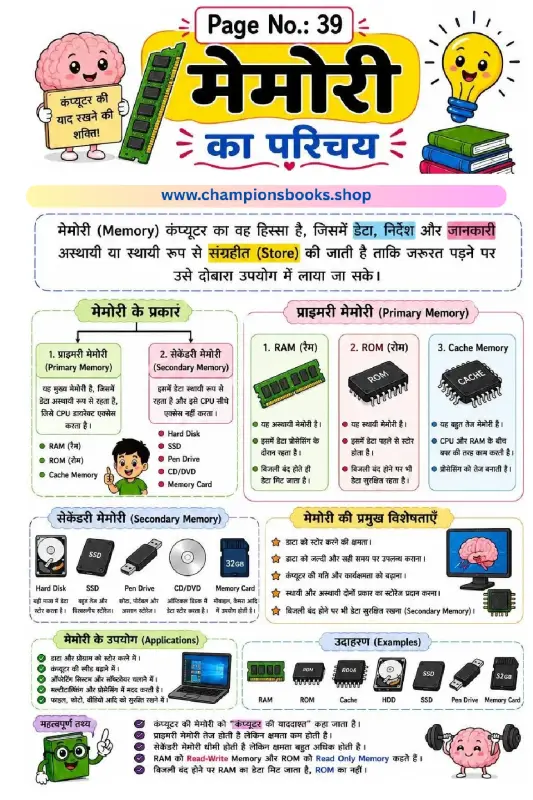
Computer Memory in Hindi Worksheet for Grade 3 Students
Introduction to Computer Memory in Hindi Introduce young learners to the fundamental concepts of computer storage with our highly engaging computer memory in hindi worksheet. Designed specifically for Grade 3 students, this colorful educational chart simplifies complex hardware concepts into easy-to-understand Hindi and English explanations. It serves as an excellent resource for parents and teachers to introduce elementary computer science concepts. What this Worksheet Covers This comprehensive worksheet provides a structured breakdown of how computers store and process data: Definition of Memory: Learn how a computer stores data, instructions, and information either temporarily or permanently. Primary Memory (प्राइमरी मेमोरी): Clear explanations of RAM (Random Access Memory), ROM (Read Only Memory), and high-speed Cache Memory. Secondary Memory (सेकेंडरी मेमोरी): Introduction to external storage devices like Hard Disks, SSDs, Pen Drives, CDs/DVDs, and Memory Cards. Key Features & Applications: Visual examples of how memory helps increase computer speed, run operating systems, and safely store files. Key Learning Benefits Using this visual guide, students will develop essential digital literacy skills: Understand the core difference between volatile (temporary) and non-volatile (permanent) storage. Identify physical computer components through clear, labeled illustrations. Grasp basic computer terminology in both Hindi and English, boosting bilingual vocabulary. Enhance critical thinking regarding how everyday devices like smartphones and laptops save information. Perfect for classroom displays, homework support, or self-paced study, this computer memory in hindi worksheet makes learning IT fundamentals fun, visual, and highly accessible for young minds!
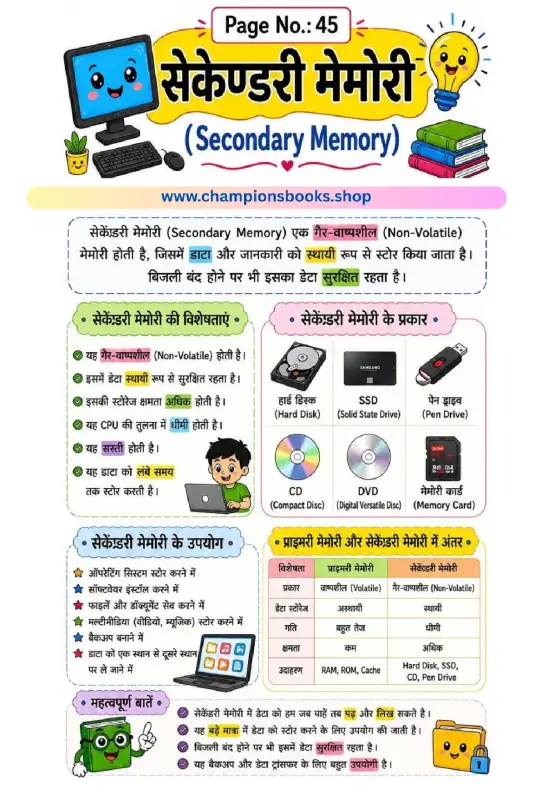
Secondary Memory Worksheet: Learn Computer Basics
About this Secondary Memory Worksheet Introduce young learners to the fundamental concepts of computer science with our colorful and engaging Secondary Memory Worksheet. Designed primarily in Hindi with English terminology, this educational chart makes it easy for elementary students to grasp the basics of non-volatile computer storage. It serves as an excellent visual aid for both classroom teaching and home study sessions, helping kids connect real-world storage devices with computer science concepts. Key Learning Benefits This worksheet helps students understand how computers store information permanently. By studying this resource, children will learn: Definition of Secondary Memory: Understand that secondary memory is non-volatile (गैर-वाष्पशील) and safely retains data even when the computer is turned off. Types of Storage Devices: Identify and name common storage devices such as Hard Disks, Solid State Drives (SSD), Pen Drives, CDs, DVDs, and Memory Cards. Key Characteristics: Learn about storage capacity, speed differences compared to the CPU, and the cost-effectiveness of secondary storage. Primary vs. Secondary Memory: Compare critical differences like volatility, speed, and capacity between primary memory (RAM/ROM) and secondary storage devices. How to Use This Worksheet Teachers and parents can use this Secondary Memory Worksheet to introduce basic computer hardware concepts. You can use the colorful illustrations to quiz students on different storage devices, ask them to identify devices they use at home, or have them write down the main differences between primary and secondary memory based on the handy comparison table provided. It is a perfect resource for Grade 3 to Grade 5 computer science curriculums.
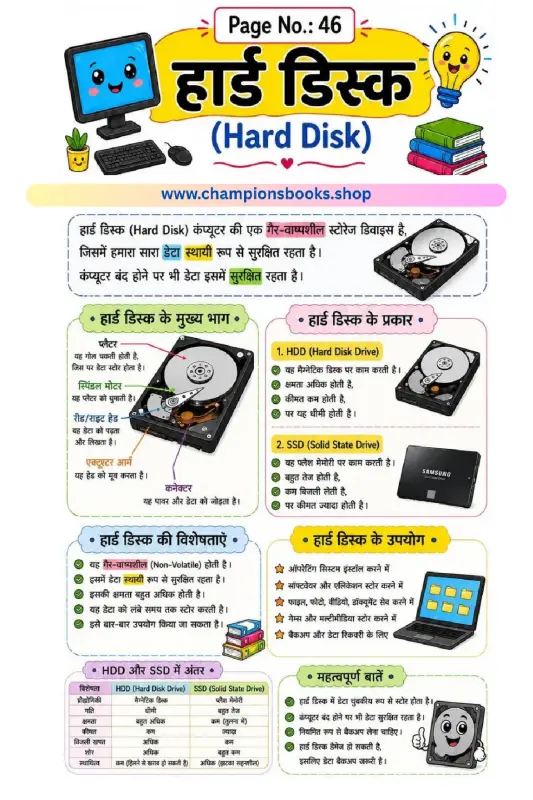
Learn Computer Hard Disk in Hindi - Free Kids Worksheet
About this Computer Hard Disk Worksheet This educational poster about the computer hard disk in Hindi is a fantastic resource for young students to understand how computer storage works. Designed with colorful illustrations and simple Hindi text, it makes complex computer science concepts highly accessible for primary school learners. Key Topics Covered Definition of Hard Disk: Introduces the concept of non-volatile (permanent) storage devices. Main Parts: Explains key internal components including the Platter, Spindle Motor, Read/Write Head, Actuator Arm, and Connector. HDD vs. SSD: A clear side-by-side comparison of Hard Disk Drives (magnetic) and Solid State Drives (flash memory). Features and Uses: Outlines why we use hard disks, such as installing operating systems, saving multimedia files, and creating data backups. Learning Benefits Bilingual Understanding: Helps kids connect English computer terminology with clear Hindi explanations. Visual Learning: Detailed diagrams of open hard drives help children visualize how computer hardware operates internally. Curriculum Aligned: Perfect for Grade 3 to Grade 5 computer applications and general science classes.
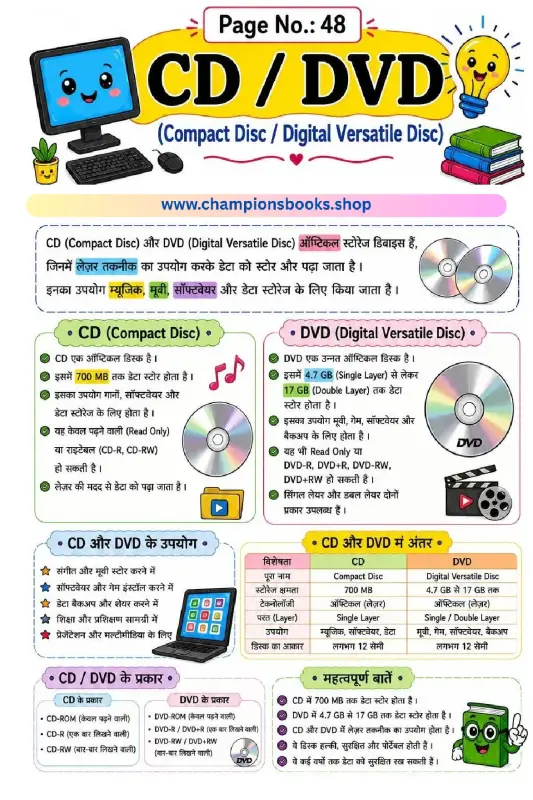
Learn CD and DVD Storage Devices - Computer Worksheet
About this CD and DVD Computer Worksheet This educational worksheet is specially designed for Grade 3 students to introduce them to basic computer storage devices, specifically CD (Compact Disc) and DVD (Digital Versatile Disc). Written in clear and simple Hindi, this worksheet helps young learners grasp technical concepts easily with the help of colorful visuals and structured comparison tables. Learning Objectives & Key Benefits Using this worksheet, students will explore the fundamentals of optical storage technology. Here are the key learning outcomes: Definition of Optical Devices: Understand how lasers are used to read and write data on CDs and DVDs. Storage Capacity Comparison: Learn that a standard CD holds up to 700 MB of data, while a DVD can store from 4.7 GB to 17 GB. Types of Discs: Differentiate between read-only, write-once, and rewritable formats such as CD-ROM, CD-R, CD-RW, DVD-ROM, and DVD-RW. Practical Uses: Identify how these storage devices are used for saving music, movies, software installation, and data backups. Key Differences: A handy comparison table helps students quickly revise the core differences in capacity, layers, and usage. Perfect for Classroom and Home Learning Whether you are a computer teacher looking for an engaging resource or a parent helping your child study at home, this CD and DVD computer worksheet is an excellent tool. It simplifies complex computer hardware concepts into bite-sized, easy-to-remember points, ensuring a strong foundation in computer literacy for primary school students.
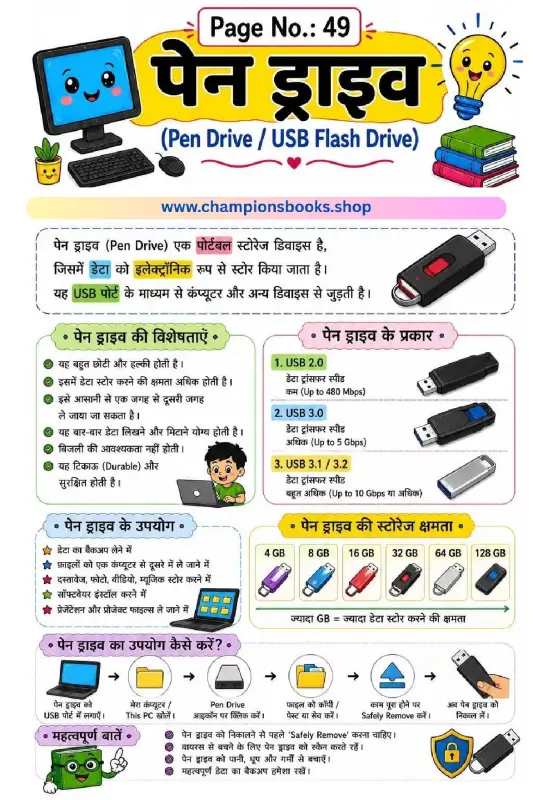
Pen Drive Worksheet in Hindi | Kids Computer Basics
About this Worksheet Introduce young learners to essential computer hardware with our comprehensive Pen Drive Worksheet in Hindi. Designed specifically for Grade 3 students, this colorful educational sheet explains the concept of USB flash drives in a simple, easy-to-understand language. It serves as an excellent resource for parents and teachers to teach basic computer literacy and digital storage concepts. Key Topics Covered Definition of Pen Drive: Learn how a portable storage device stores data electronically and connects to computers via a USB port. Features & Benefits: Discover why pen drives are popular, highlighting their portability, high storage capacity, durability, and ease of use. Types of USB: Understand the differences between USB 2.0, USB 3.0, and USB 3.1/3.2, including their respective transfer speeds (Mbps to Gbps). Storage Capacities: Explores different capacities ranging from 4 GB up to 128 GB. Step-by-Step Usage: A clear visual guide showing how to insert, open, copy-paste files, safely remove, and unplug the device. Best Practices & Safety: Crucial tips on scanning for viruses and protecting the drive from physical damage. Learning Benefits Builds foundational knowledge of computer storage systems. Enhances technical vocabulary in both Hindi and English. Promotes safe and responsible technology habits among primary school students.
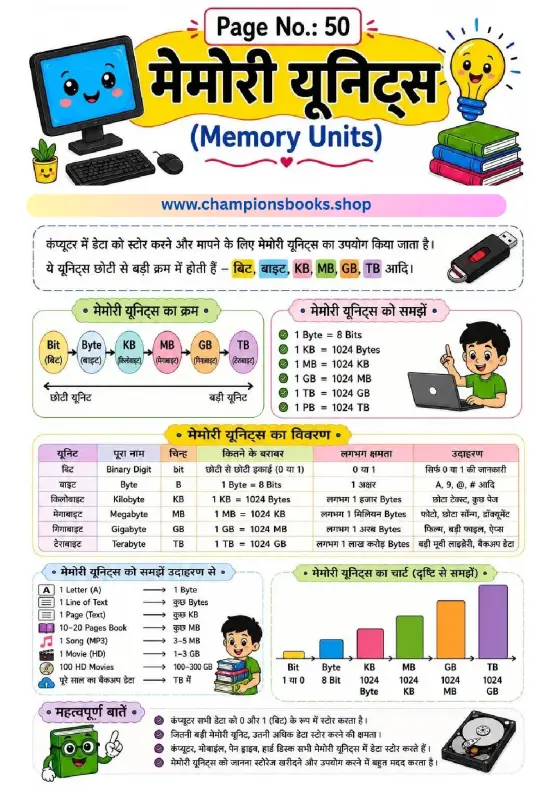
Computer Memory Units in Hindi Worksheet for Kids
About this Computer Memory Units Worksheet Introduce young learners to the basics of computer storage with our colorful Computer Memory Units in Hindi Worksheet. Designed specifically for elementary students, this educational resource simplifies complex computer science concepts into easy-to-understand Hindi and English explanations. Students will learn how computers store data, starting from the smallest unit to the largest. Key Learning Benefits Sequential Learning: Understand the correct order of memory units from smallest (Bit) to largest (Terabyte). Practical Examples: Relate digital storage to real-world files, such as equating 1 Byte to a single letter and 1-3 GB to an HD movie. Clear Conversion Chart: Master unit conversions easily, learning that 1 KB equals 1024 Bytes, 1 MB equals 1024 KB, and so on. Visual Representation: The colorful bar chart helps kids visualize the scale of storage capacity progression. What is Included in the Worksheet? This comprehensive study guide features several sections to reinforce learning: Memory Order Flow: A step-by-step visual path showing Bit, Byte, Kilobyte (KB), Megabyte (MB), Gigabyte (GB), and Terabyte (TB). Detailed Data Table: A structured breakdown containing unit names, symbols, exact values, approximate capacities, and real-life examples in Hindi. Important Facts: Crucial takeaways, such as how computers store all data as 0s and 1s, and why larger storage units are beneficial. Perfect for classroom activities, homeschooling, or quick revision, this worksheet is an essential tool for building early digital literacy skills in children.
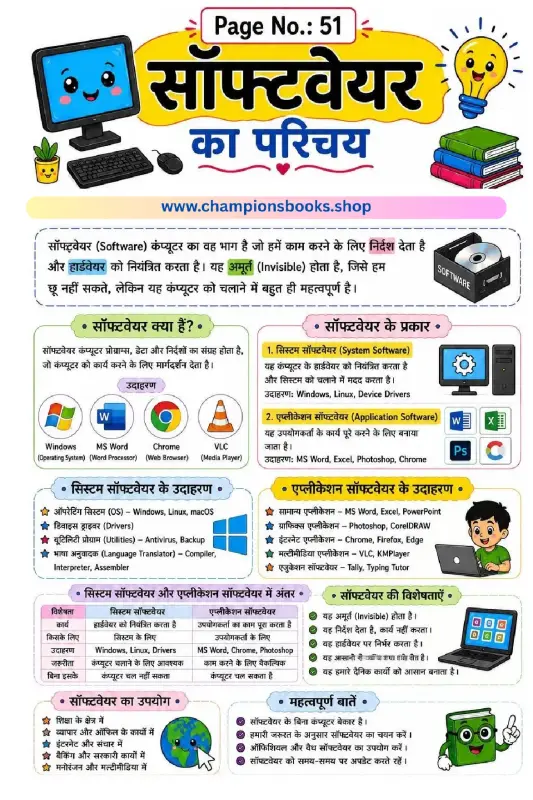
Introduction to Computer Software Worksheet in Hindi
About this Worksheet Our Introduction to Computer Software Worksheet in Hindi is designed specifically for Grade 3 students to help them grasp the fundamental concepts of computer software. This beautifully illustrated, easy-to-understand study guide explains what software is, its primary functions, and how it differs from hardware. Written entirely in Hindi, it serves as an excellent resource for Hindi-medium schools and homeschooling parents teaching elementary computer science. With colorful visuals, clear diagrams, and a structured layout, this worksheet makes learning computer basics engaging and memorable. It breaks down complex technical terms into simple, digestible points that children can easily comprehend and apply. Learning Benefits Using this educational worksheet helps young learners develop key technical skills: Conceptual Clarity: Understands the core difference between system software and application software. Real-world Examples: Learn to identify common software programs like Windows, MS Word, Google Chrome, and VLC Media Player. Bilingual Familiarity: Connects Hindi computer terms with standard English terminology. Critical Thinking: Encourages students to distinguish between essential operating systems and user-specific applications. Key Concepts Covered This comprehensive worksheet covers vital topics in elementary computer education, including: What is Software? An introduction to the invisible instructions that guide computer hardware. System Software: Understanding operating systems (OS) like Windows and Linux, device drivers, and utility programs. Application Software: Exploring everyday tools like word processors, web browsers, and media players. Key Differences: A handy comparative table highlighting the differences in purpose, necessity, and examples. Uses of Software: How software impacts education, business, banking, and entertainment.
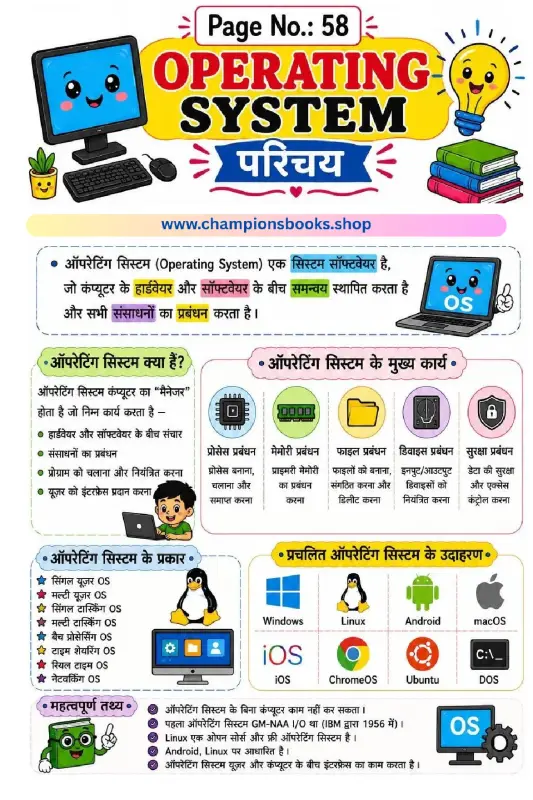
Operating System Worksheet in Hindi for Grade 3 & 4
About this Operating System Worksheet in Hindi Introduce young learners to the core concepts of computer science with our engaging Operating System Worksheet in Hindi designed for Grade 3 students. This colorful and educational worksheet simplifies complex computer concepts, making it easy for children to understand how an operating system acts as the "manager" of a computer. Written in clear Hindi, it serves as an excellent resource for classrooms, homeschooling, and self-study. Key Learning Concepts Covered This comprehensive worksheet covers vital topics about operating systems, helping students build a strong foundation in computer literacy: Introduction to OS: Understands how an operating system coordinates between computer hardware and software. Functions of an OS: Explains key management tasks such as process management, memory management, file management, device control, and security. Types of Operating Systems: Introduces concepts like Single-User, Multi-User, Single-Tasking, and Multi-Tasking systems. Popular Examples: Features recognizable operating systems including Windows, Linux, Android, macOS, iOS, and DOS. Fun Facts: Includes interesting trivia like the first operating system (GM-NAA I/O) developed by IBM in 1956. Benefits of Using this Worksheet Our Operating System Worksheet in Hindi provides several educational benefits for primary school students: Bilingual Understanding: Helps Hindi-medium students grasp technical computer terms easily. Visual Learning: Bright illustrations and icons keep young minds engaged and improve retention. Curriculum Aligned: Perfectly aligned with elementary computer science curricula for Grade 3 and above.
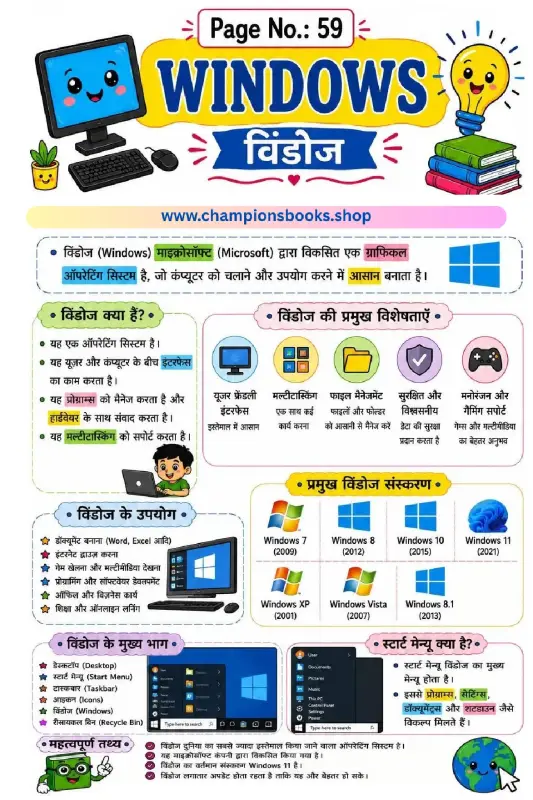
Windows Operating System in Hindi Worksheet for Grade 3
About this Windows Operating System Worksheet Introduce young learners to the basics of computers with our engaging Windows Operating System in Hindi Worksheet. Specially designed for Grade 3 students, this colorful educational poster and worksheet provides a comprehensive introduction to Microsoft Windows, making complex concepts easy to understand in Hindi. It serves as an excellent resource for primary school teachers and parents looking to build strong foundational computer skills in children. What Students Will Learn This worksheet is packed with visual aids and simplified explanations covering key computer concepts: What is Windows? An easy-to-understand definition of an Operating System (ऑपरेटिंग सिस्टम) and how it bridges the gap between the user and computer hardware. Key Features of Windows: Highlights important features like a user-friendly interface, multitasking support, secure file management, and gaming capabilities. Evolution of Windows: A visual timeline of major versions from Windows XP (2001) all the way to Windows 11 (2021). Core Components: Introduction to essential parts of the interface, including the Desktop, Start Menu, Taskbar, Icons, and Recycle Bin. Learning Benefits for Grade 3 Students Bilingual Learning: Helps Hindi-medium students grasp technical computer terms alongside their English equivalents. Visual Memory Aids: Bright illustrations of computers, operating system logos, and icons keep children engaged and improve retention. Practical Knowledge: Prepares kids for real-world computer usage by explaining practical applications like document creation, internet browsing, and file organization. Download and use this worksheet to make computer science lessons fun and interactive. Whether for classroom teaching or home study, this guide is the perfect stepping stone for future digital literacy!
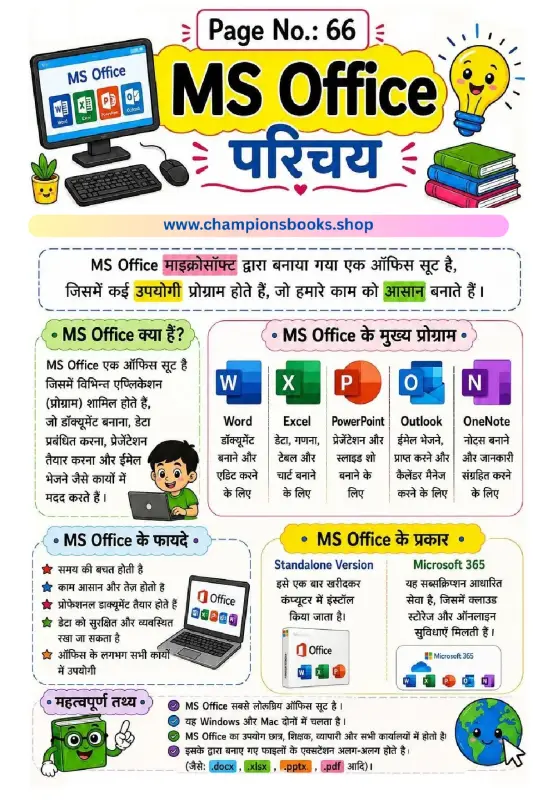
Learn MS Office Introduction in Hindi Worksheet for Kids
About this MS Office Introduction Worksheet This educational worksheet is designed to introduce young students to the basics of Microsoft Office. Written in simple Hindi with colorful illustrations, the MS Office Introduction in Hindi Worksheet helps kids understand the fundamental tools used in everyday computer tasks. It is perfect for Grade 3 to Grade 5 students who are starting their digital learning journey and need clear, visual study guides. Key Topics Covered in the Worksheet What is MS Office? A simple explanation of the office suite and how it simplifies school and business tasks. Core MS Office Programs: Introduces the main applications like MS Word (for documents), MS Excel (for spreadsheets), MS PowerPoint (for presentations), Outlook (for emails), and OneNote (for notes). Benefits of MS Office: Highlights how these tools help save time, organize data securely, and create professional-looking documents. Types of MS Office: Explains the difference between the Standalone offline version and the cloud-based Microsoft 365 subscription. Important File Extensions: Teaches kids about common formats such as .docx, .xlsx, .pptx, and .pdf. Learning Benefits for Kids By studying this interactive Hindi worksheet, students will: Build a strong foundation in essential computer literacy. Easily recognize standard software icons and understand their primary functions. Learn how technology simplifies academic and professional work. Get ready for school computer lab practical exams and classroom projects.
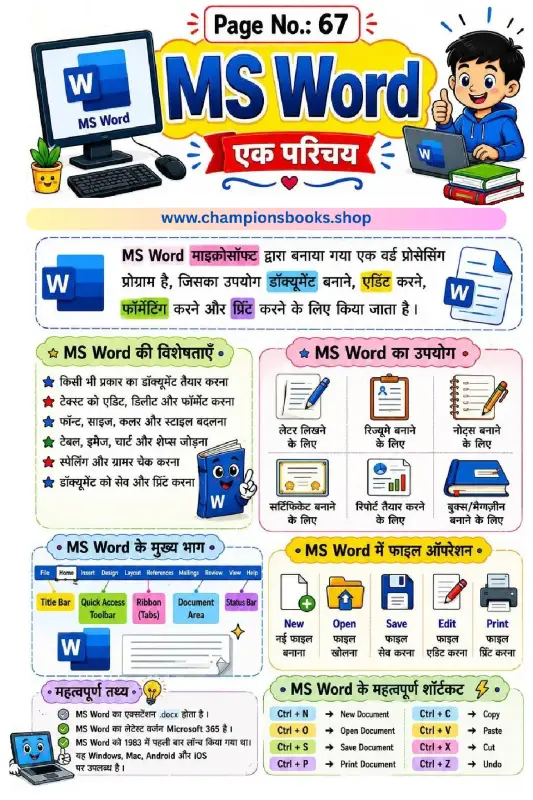
MS Word Worksheet in Hindi: Learn Basics & Shortcuts
About this MS Word Worksheet in Hindi Introduce young learners to the basics of word processing with our engaging and colorful MS Word Worksheet in Hindi. Designed specifically for primary school students, this educational resource simplifies complex computer concepts, making digital literacy fun, visual, and easy to grasp in Hindi. Key Learning Features This comprehensive study guide covers all the essential aspects of Microsoft Word, helping students build a strong foundational knowledge of computer systems: Introduction to MS Word: A simple, bilingual definition explaining how Microsoft Word is used to create, edit, format, and print documents. Features of MS Word: Highlights key capabilities like font customization, table insertion, spelling check, and document saving. Real-World Uses: Colorful illustrations showing how MS Word is used to write letters, create resumes, take notes, and make reports. Main Parts of MS Word: A clear visual breakdown of the interface, including the Title Bar, Ribbon, Quick Access Toolbar, and Status Bar. File Operations: Step-by-step icons explaining how to create a New file, Open, Save, Edit, and Print. Essential Keyboard Shortcuts Included Learning shortcuts helps kids build typing speed and computer confidence. This worksheet features a handy shortcut reference guide: Ctrl + N & Ctrl + O: Create a New document and Open an existing file. Ctrl + S & Ctrl + P: Save your work and Print documents instantly. Ctrl + C, V, X, Z: Master the essential editing commands for Copy, Paste, Cut, and Undo. Why Choose This Worksheet? With its vibrant illustrations, child-friendly layout, and simple Hindi explanations, this worksheet is perfect for elementary classrooms, homeschooling, and computer lab activities. It bridges the gap between theory and practical computer skills seamlessly.